

Looking for a fast Delaware entity search? Use Delaware’s public business search to find any LLC or corporation by name or file number, then review key details like entity type, formation date, and registered agent. For official proof of status, follow the record to the Online Status tool or order a Certificate of Good Standing; for new formations, run a Delaware name availability check first.
How to Perform a Delaware Entity Search
Delaware’s General Information Name Search lets you look up any registered business by Entity Name or File Number and returns results in real time. The results list includes active and inactive entities and, per the notice on the page, is not an indication of current status. You’ll confirm identity on the free detail page, then use paid tools if you need official proof.
Step 1 – Open the official search page
Go to the Division of Corporations’ General Information Name Search. This page is the only authoritative free lookup for Delaware entities.
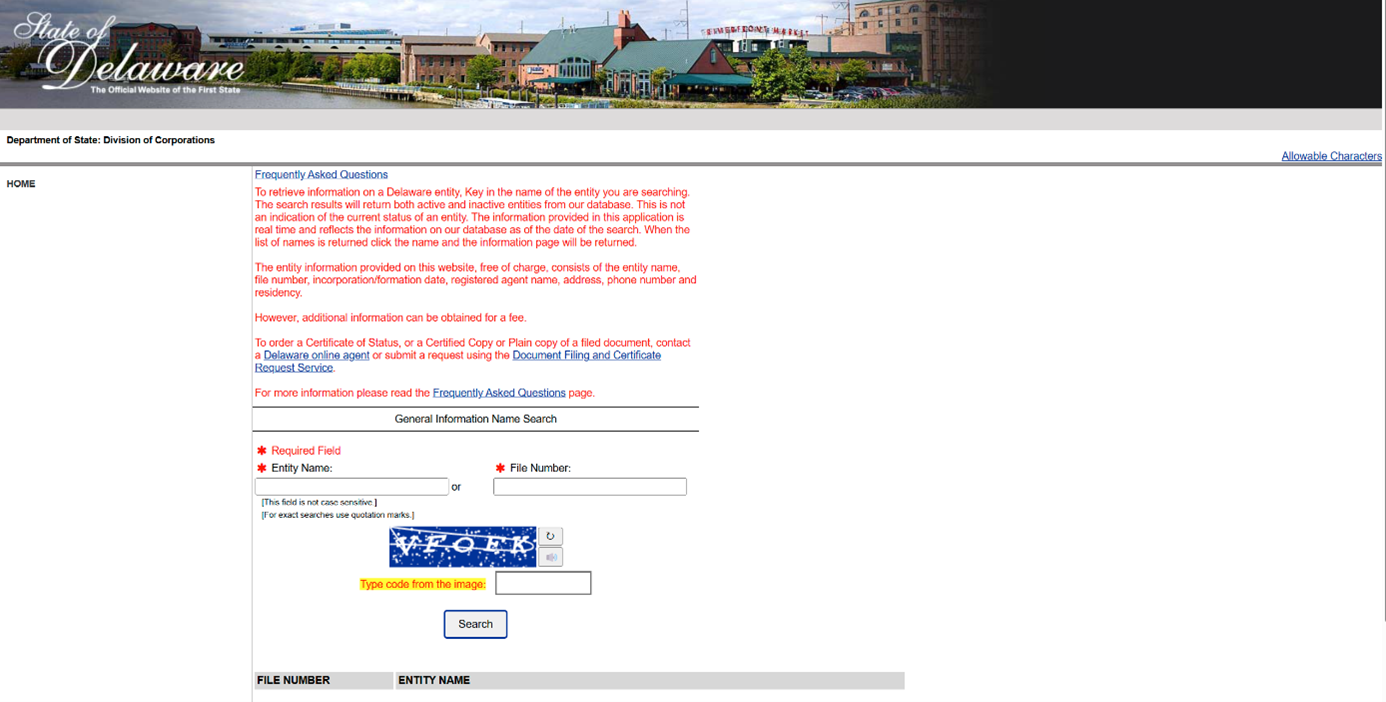
Step 2 – Choose your lookup: Entity Name or File Number
Pick one input method:
- Entity Name: type a distinctive name (e.g., Blue Coast, Harbor Ridge Holdings, Bayfront Analytics, Cedar & Slate Studio).
- File Number: paste the exact Delaware file number if you have it (e.g., from prior documents).
The form is not case sensitive and supports exact-phrase searches with quotation marks.
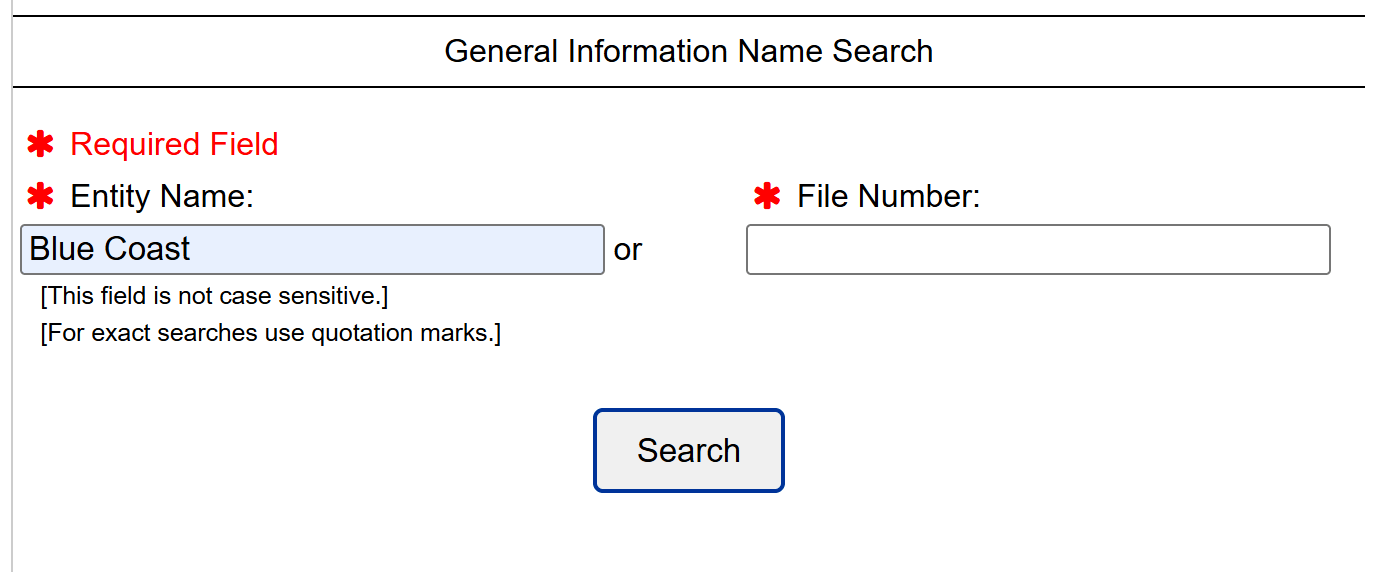
Step 3 – Refine & Interpret Your Results
When you press Search, Delaware returns a simple table with two columns (FILE NUMBER and ENTITY NAME), and it includes both active and inactive entities. That list is a snapshot, not a status check. To narrow the noise and spot true conflicts, use the tactics below (illustrated with “BLUE COAST” example, which naturally produces a long list).
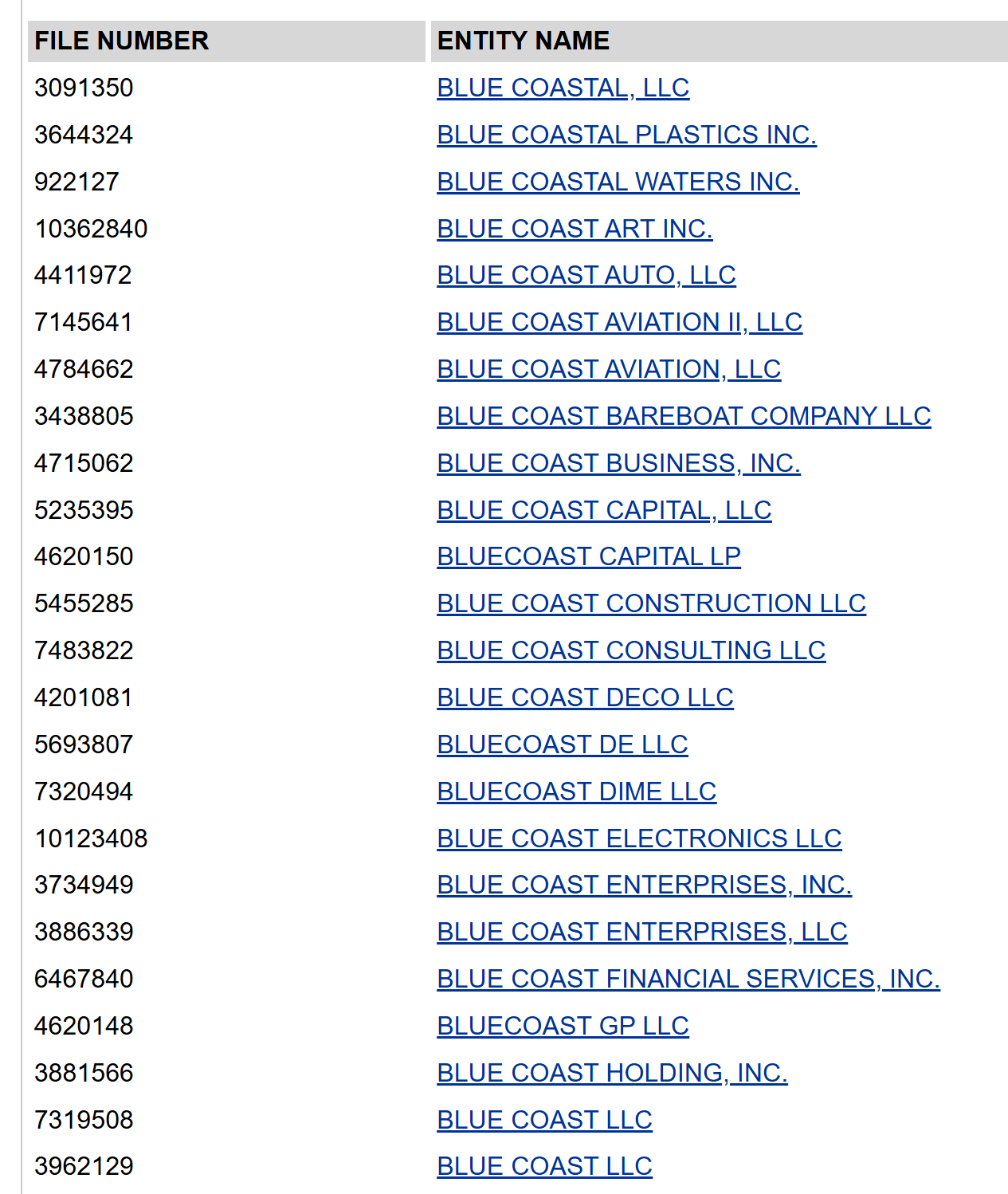
How to tighten a busy results list (with “BLUE COAST” examples)
- Run an exact-phrase pass.
Re-run as “Blue Coast” (quotes). This trims out looser matches and shows entities that contain the exact phrase, e.g., BLUE COAST CAPITAL, LLC and BLUE COAST ENTERPRISES, INC. The search is not case-sensitive and supports quotes for exact matches. - Add one distinctive word to test availability.
Try “Blue Coast Holdings”, “Blue Coast Harbor”, or “Blue Coast Robotics”. You’re probing for a distinguishable name, Delaware requires names to be “distinguishable upon the records” for both LLCs and corporations. If the same stem already appears many times, a fresh lead word (or a coined brand) usually tests better than cosmetic tweaks. - Reverse or restructure the phrase.
If “Blue Coast” is noisy, try “Harbor Blue” or a different stem entirely (e.g., “Azure Coast”, “Coastline Harbor”). You’re checking whether a truly new brand element reduces collisions under the distinguishability rule. - Click into likely conflicts and read the free detail page.
Open the closest matches to compare Entity kind/type, Residency (Domestic/Foreign), Formation date, and Registered agent. This helps you judge whether a near match is truly a conflict or a different kind of entity you can steer around. (Remember: the free page doesn’t confirm good standing, status/certificates are separate.) - Iterate until you have a clean candidate, then (optionally) reserve it.
Once your query returns only distant names, or none, consider moving forward with filing or lock it with a 120-day Name Reservation if you need time.
Quick “BLUE COAST” sandbox, what usually passes vs. risks
Use this table to think like the examiner while you iterate names in the search box.
| Candidate name (example) | Risk level | Why / how to improve |
|---|---|---|
| Blue Coast LLC | High | Same core phrase appears many times; expect unavailability. Add a new lead word or pick a different stem. |
| Blue Coast Company LLC | High | Generic endings rarely help with distinctiveness. Choose a unique brand element (e.g., coined or geographic + specific). |
| Blue Coast of DE LLC | Med–High | Adding state/locale is often too weak; aim for a stronger modifier. |
| Blue Coast Harbor LLC | Medium | Adds a specific descriptor; may be OK, but still shares the common stem—check results carefully. |
| Harbor Blue Coast LLC | Lower | New lead element improves distinctiveness; confirm by searching both “Harbor Blue Coast” and “Blue Coast” stems. |
| Azure Coast Holdings LLC | Lower | Swaps the color term and adds a specific descriptor; typically easier to distinguish. |
Step 4 – Open the entity detail page and verify the record
Click a name to open its free detail page, which shows core data pulled in real time. Use this to confirm you’ve got the right company.
What you’ll see on the free page: entity name, file number, incorporation/formation date, registered agent name, agent address & phone, and residency (Domestic/Foreign).
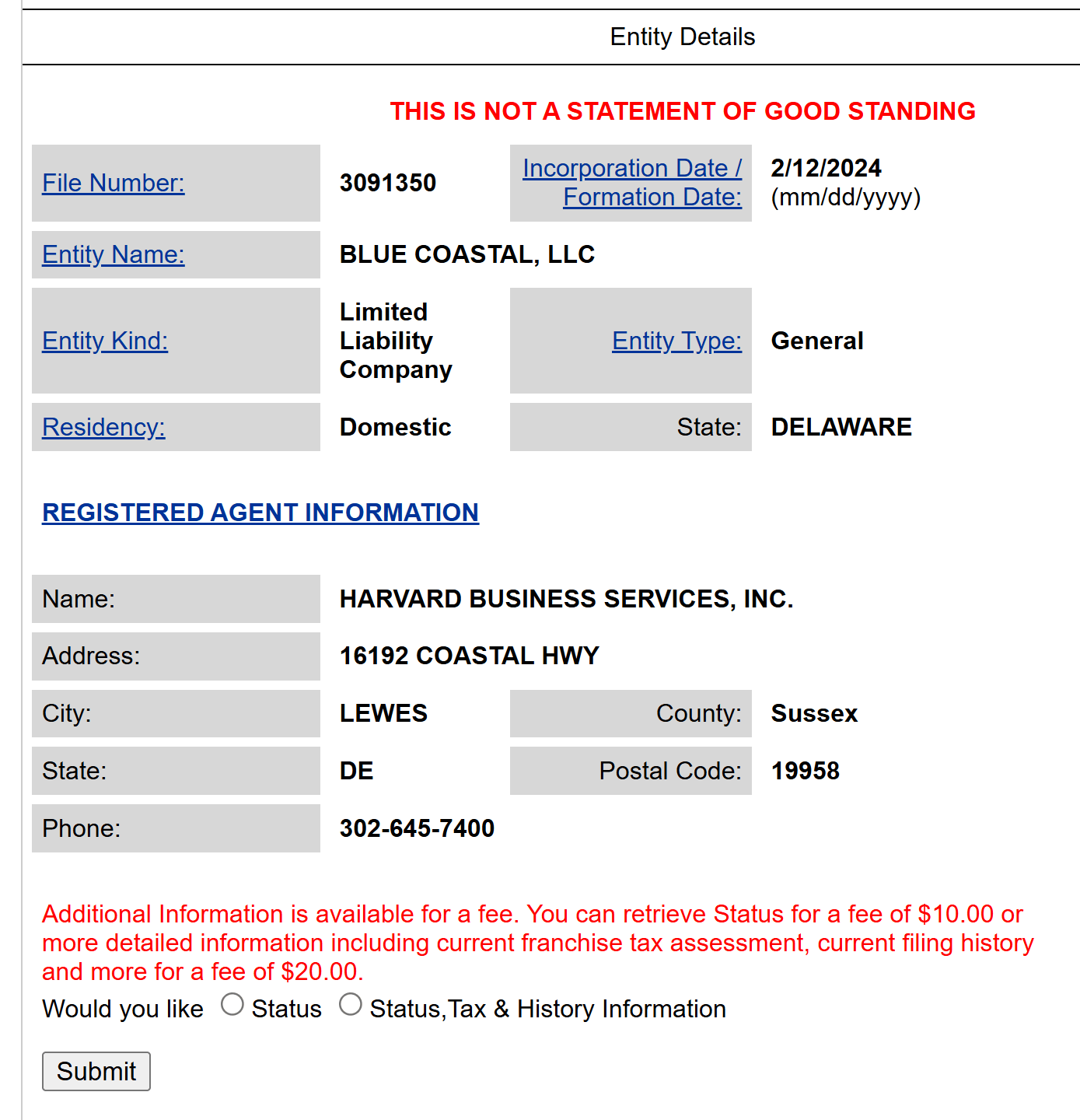
Step 5 – Request documents or certificates if needed
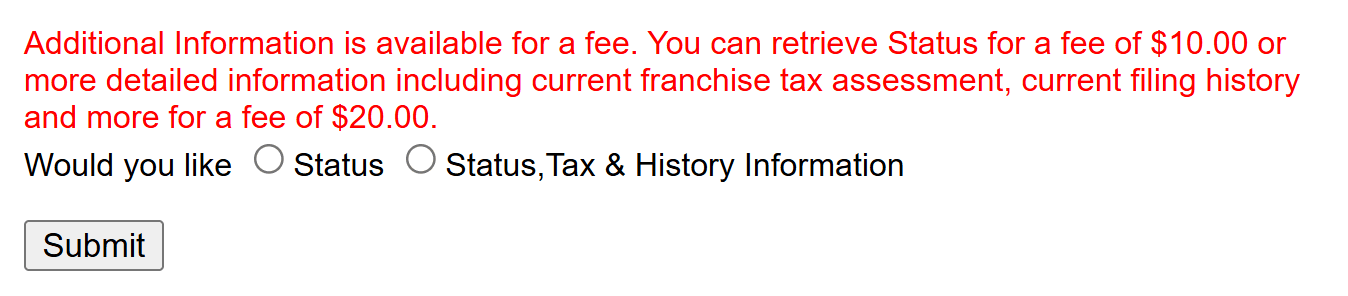
The free page doesn’t prove good standing. For official confirmation, use Online Status (two options): Status ($10) or Status + Tax & History ($20). For bank-ready evidence, order a Certificate of Status/Good Standing via the Document Filing & Certificate Request Service.
Step 6 – Optional for new names: check availability or reserve
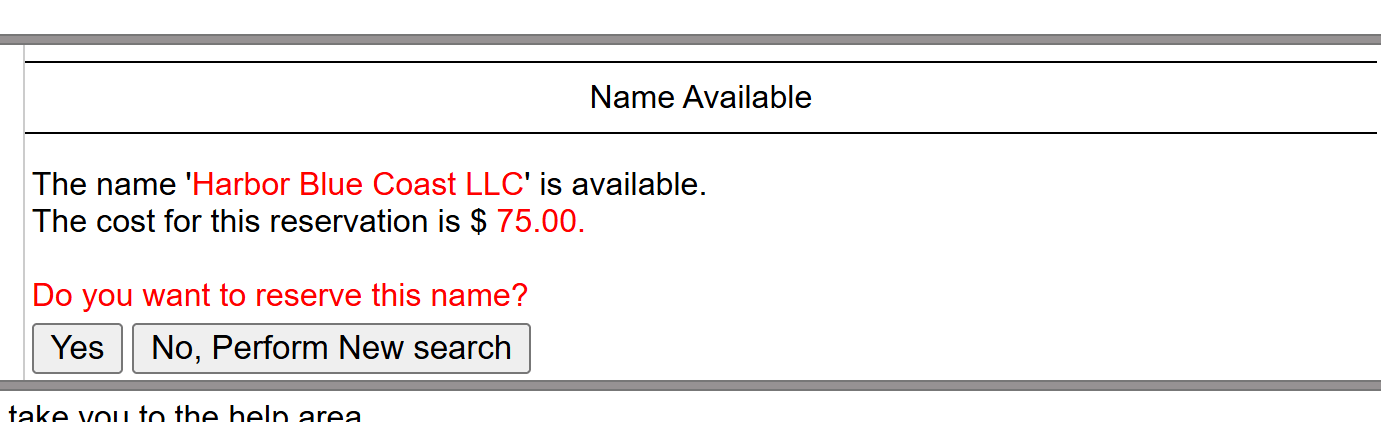
If you’re searching to secure a brand-new name, use the Division’s Name Reservation tool (Example names to test availability: Harbor Blue Coast LLC.):
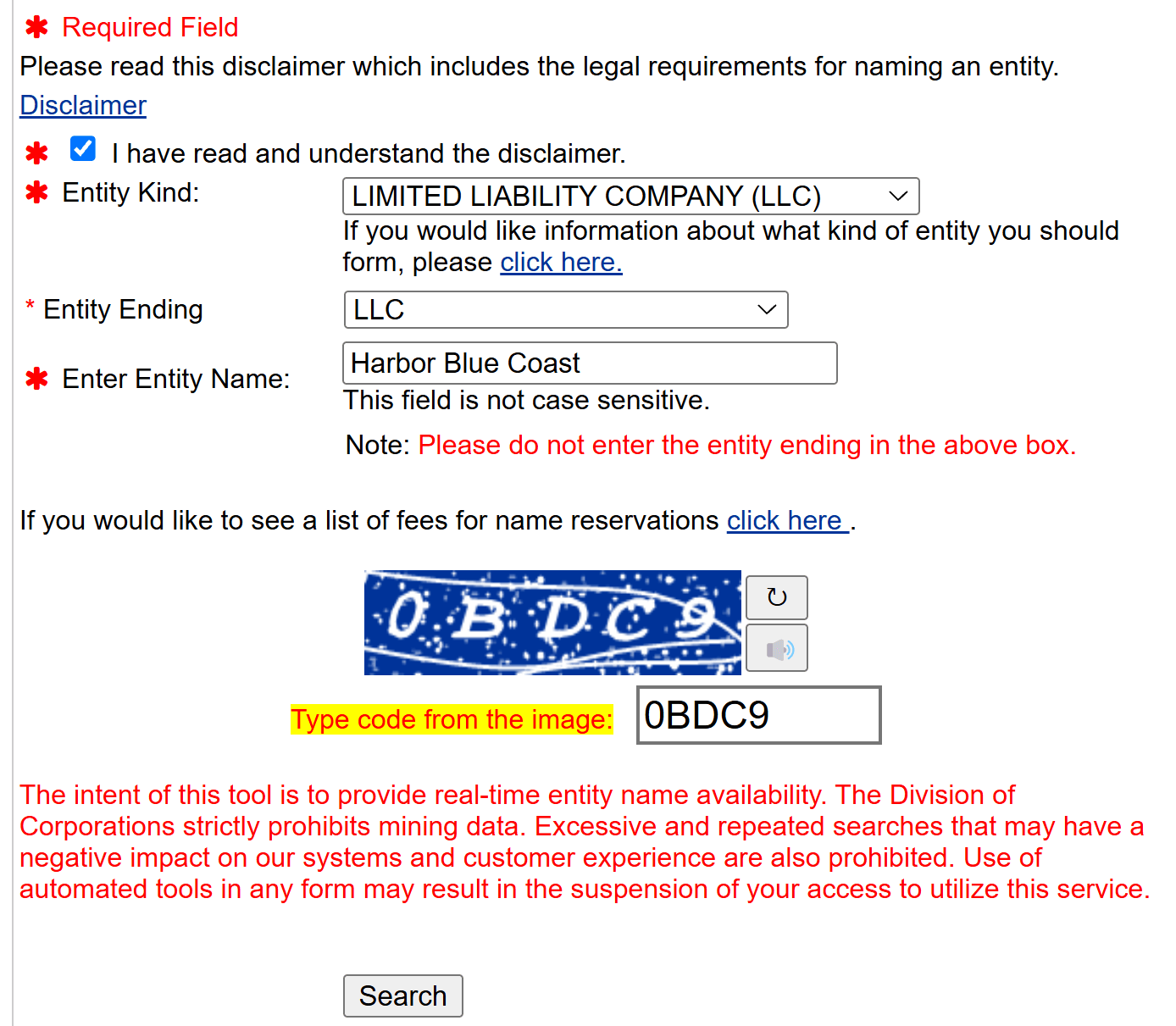
Holds the name 120 days for $75; you can reserve or re-reserve online.
Secure your Delaware LLC now
ZenBusiness helps you form your Delaware LLC fast, starting at $0 + state fees. Includes compliance tools and real-time updates.
What Information You’ll Find in the Search Results
This section is your data dictionary for Delaware’s free entity page, nothing more, nothing less. It lists what the Division says you’ll see on the free detail view, pulled in real time from state records. If you need status or official proof, jump back to “Read Delaware Results Correctly.”
| Field on the free page | What it means / how to use it |
|---|---|
| Entity name | The official name on Delaware’s registry; confirm spelling and distinguish near matches. |
| File number | Delaware’s unique ID for the entity; needed for orders and future filings. |
| Entity kind & type | Classification (e.g., Corporation, LLC) and subtype to ensure you’re in the right record. |
| Residency (Domestic/Foreign) | Whether the entity was formed in Delaware or registered from another state. |
| Incorporation/formation date | When the entity was created in Delaware; helpful for diligence timelines. |
| Registered agent (name, DE address, phone) | The in-state contact for service of process, shown on the free detail page. |
Read Delaware Results Correctly
Delaware’s free General Information Name Search is a snapshot, useful to locate the right record, but the state is explicit: the results include active and inactive entities and are not an indication of current status. If you need to prove something (to a bank, vendor, or another state), you must use Delaware’s status or certificate tools.
Before ordering anything, decide what you actually need:
| Your goal | Best tool | Cost | Why this is right |
|---|---|---|---|
| Quick internal check of current status | Online Status – “Status” | $10 | Shows current status with a “Status as of” date; printable but not a certificate. |
| Deeper due diligence (status + recent filings & franchise tax info) | Online Status – “Status + Tax & History” | $20 | Adds recent filings and current tax assessment; still not a certificate. |
| Official proof for third parties | Certificate of Status/Good Standing (order via Document Filing & Certificate Request) | $50 Short Form (name + status) or $175 Long Form (adds full filing history) | State-sealed certificate; accepted by banks and agencies. Expedited options per the current fee schedule. |
Pro tips to avoid rework:
Use quotation marks for exact-phrase searches; the form isn’t case-sensitive. Save the file number from the free record so you can order status/certificates faster later. If you’re not ready to file a new entity, use Name Reservation to hold the name for 120 days ($75).
Common Pitfalls to Avoid During a Delaware Entity Search
A Delaware entity search is powerful, but small mistakes can lead to bad assumptions. Use this list to avoid the most common errors.
- Ignoring status labels
Do not treat every result as active. Watch for “Void,” “Cancelled,” or “Not in Good Standing,” which can mean missed filings or a dead entity. - Relying only on the name
Similar names can belong to different entities. Always confirm the file number and entity type, not just the spelling of the name. - Overlooking registered agent and address mismatches
If the registered agent or address on the record does not match other information you have, treat it as a warning sign and verify with the agent or the state. - Assuming franchise tax is current
An entity can appear in the database while still owing Delaware franchise tax. For serious deals, ask for proof of good standing or confirm status through official channels. - Treating the search as final approval for your own name
The fact that a name does not appear in results does not guarantee the state will accept it. Use the official name availability tools and remember that true confirmation happens only when Delaware files your formation. - Using results as a substitute for legal due diligence
The public record is a starting point, not a full legal picture. For investments, acquisitions, or major contracts, have a professional review status, history, and any
Protect your privacy in Delaware
Start your Delaware LLC with Northwest and get premium privacy, expert support, and registered agent service included.
Steps After Completing Your Delaware Entity Search
Once you have completed a Delaware entity search and confirmed that your preferred name is available, your next moves should turn those results into a real, usable business. Use these steps as a simple checklist.
- Decide whether to file now or reserve the name
If you are ready, move straight to forming your LLC or corporation with the Delaware Division of Corporations using the name you just checked. If you still need time to organize documents or funding, you can reserve the name for a limited period so no one else registers it while you prepare. - Register your Delaware entity
Choose your structure (for example, LLC or corporation) and file the appropriate formation document with the state. Proper registration is what creates the entity in law and gives you liability protection, access to business banking, and the ability to sign contracts under the company name. - Set up tax, banking, and basic compliance
Apply for an EIN with the IRS, open a business bank account, and confirm what licenses, permits, and tax registrations you need where you will actually operate. For Delaware entities, this includes keeping a registered agent on file and staying current on franchise tax and any required reports. - Use search results for due diligence and ongoing management
If you used the Delaware entity search to review another business, revisit the record to confirm status, standing, and filing history before partnering or investing. For your own entity, create a simple system or calendar to track key deadlines so your Delaware business remains in good standing year after year.
FAQ – Delaware Entity Search and Business Filing
Below, you’ll find concise answers to the most common questions about searching and registering businesses in Delaware. Each response is designed to give you immediate clarity, helping you avoid delays or confusion when navigating the state’s system.
Is the Delaware entity search tool free to use?
Yes, Delaware provides free public access to its entity search tool, allowing users to view basic details such as the formation date, file number, and current status of each registered company. If you need certified copies or additional documentation, there may be fees for ordering official records. However, for a quick lookup, like verifying a new partner or reviewing your own registration, the standard search function is available at no cost.
What’s the difference between entity search and name availability search?
An entity search pulls up information on a specific business, including its status, registered agent details, and key filing dates. In contrast, a name availability search checks if a proposed name is already in use or too similar to an active entity. If your priority is to confirm whether you can register your chosen Delaware business name, then focus on name availability first. If you need an organization’s background or compliance record, the entity search is your best starting point. You can also follow this step-by-step guide to check LLC names and avoid future rebranding issues.
How do I know if a business is in good standing?
Look at the status listed in the search results on Delaware’s official platform. If it shows “Good Standing,” the entity has met its annual report filing requirements and paid any franchise tax obligations. You can also request a Certificate of Good Standing for definitive proof. Keep in mind that a company’s good standing can lapse if it misses deadlines or fails to pay taxes, so always verify the date on any status-related document.
How can I reserve a business name in Delaware?
You can complete a name reservation by filing online through the Delaware one stop website or by submitting a paper form to the Division of Corporations. Include your chosen business name, your contact details, and the required fee. Once approved, Delaware sets aside that name for a specific duration (usually 120 days) allowing you time to prepare formation documents without worrying another entity will claim it in the meantime.
How long does a name reservation last?
In Delaware, a standard reservation lasts 120 days from the approval date. After that period, you can typically renew if you still haven’t filed your formal certificate of formation or incorporation. Keep an eye on your expiration date because once the reservation lapses, the name in Delaware becomes publicly available again. Additional fees apply for each extension, so it’s wise to either finalize your filing or ensure you renew before the initial window ends.
How do I request a Certificate of Good Standing?
From the Delaware division of corporations website, locate the option to obtain certified documents. Provide the entity’s file number or exact Delaware company name search details and pay the associated fee. You’ll receive an official certificate verifying the business’s status, which can be crucial for international transactions, loan applications, or negotiations with potential partners. Processing times vary, but expedited services are often available for an additional charge.
What taxes or fees do Delaware entities need to pay?
The most common recurring cost is the franchise tax, assessed annually on corporations (and in some instances, LLCs). Entities must also submit an annual report with up-to-date contact and capitalization details. Fees vary based on share structure or overall business size, so larger enterprises might pay more. Failure to meet these obligations can result in penalties, a loss of good standing, or eventual dissolution by the secretary of state if left unaddressed.
- Delaware Division of Corporations: LLC/LP/GP $300 Annual Tax – Instructions
- Delaware Division of Corporations: Change of Registered Agent – Forms (all entities)
- Delaware Code Online: Title 6 §18-102 – LLC name requirements
- Delaware Code Online: Title 8 §312 – Revival of certificate of incorporation
- Delaware Courts – Superior Court: Trade, Business & Fictitious Names (DBA)
- USPTO: Trademark Search
- Delaware Division of Revenue: Licensing & Registration Information
- IRS: Get an Employer Identification Number (EIN)
Looking for an overview? See Delaware LLC Services
Launch your Delaware business easily
Harbor Compliance handles your Delaware LLC filing and keeps you compliant with fast, reliable service from day one.