

For entrepreneurs and investors, verifying business records is essential to ensure legitimacy, avoid name conflicts, and confirm that a company is in good standing. Whether you’re starting a Florida LLC, checking a competitor’s status, or validating a partnership, knowing how to navigate the Sunbiz platform is crucial.
Understanding Florida Business Entities
In Florida, business owners have access to a robust system for establishing and managing business entities, including limited liability companies, limited partnerships, and private corporations. The florida business entity search process lets you locate essential data on existing business names, confirm legal status, and review filings. Whether you plan to register your business for the first time or want to verify your business name, having a grasp of these records is vital. Up-to-date information from the florida department supports strategic decisions around entity formation, compliance, and intellectual property protection.
Defining a Florida Business Entity and Its Importance
A Florida business entity is any officially recognized organization operating in the state, such as a limited liability company(LLC) or corporation, that is registered through the division of corporations. Creating a legal structure not only offers tax advantages and liability protection but also ensures that your desired business name is uniquely yours. Each entity must meet business registration requirements set by the Florida government, such as filing the articles of organization or articles of incorporation, and appointing a registered agent. Maintaining this recognized status helps build credibility with clients, protect intellectual property, and provide a foundation for lasting success. In 2025, reviewing a company’s background via a search in florida is an increasingly common practice, as it ensures that the business is operating lawfully and has complied with mandated reporting requirements.
Check Business Name Availability Fast
ZenBusiness helps you verify and register your Florida LLC name to ensure compliance and avoid conflicts.
How the Florida SOS System (Sunbiz) Powers Public Record Searches
The Florida Secretary of State’s Sunbiz platform is the official repository for business entities data, enabling you to perform a florida business lookup at no charge. It houses details on:
- Company register entries
- Mailing address and street address
- Florida registered agent records
- Document filings, such as annual reports
By accessing the Florida SOS system, you can confirm key information, like whether a business name in florida is already taken or if a particular employer identification number corresponds to a valid operation. With each record, you gain insight into whether the entity is in good standing, has adhered to reporting requirements, and remains an official business recognized by the state. This ease of access enhances transparency and reduces risk for entrepreneurs and consumers alike.
Mastering the Florida Business Search Process (Step-by-step)
Navigating the Florida Department of State’s website (often known as Sunbiz) can be streamlined by following these steps. Below is a comprehensive guide to help you locate essential information, check entity name availability, and finalize your research:
Step 1 – Open the Official Sunbiz “Search Records” page
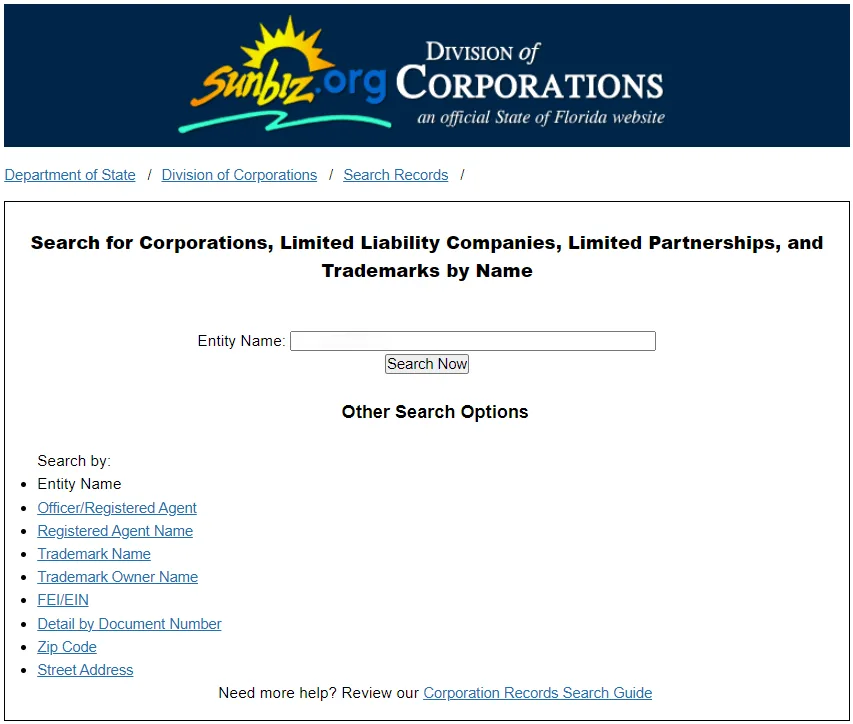
Start by visiting the official Sunbiz site, where you’ll see search features on the main page. You’ll land on the “Search … by Name” page with an Entity Name box and a left-side Search by: menu. From that menu, pick what matches what you know:
- Entity Name (best for name checks + general lookup)
- Officer/Registered Agent (find entities tied to a person/agent)
- Registered Agent Name (find entities tied to an agent/company name)
- Detail by Document Number (fastest if you have the ID)
- FEI/EIN, Zip Code, Street Address (useful for investigations)
Step 2 – Search by Entity Name (best for most people)
This is the workflow you’ll use 90% of the time.
- Stay on Entity Name search (it’s the default on the page shown).
- In the “Entity Name:” field, start with your core keywords (not the suffix).
- Click Search Now.
Practical example (realistic name check):
You want “Sunrise Bakery LLC”.
- First search: Sunrise Bakery (no “LLC”)
- Second search: Sunrise Bake (partial keyword) if you get too many results

Step 3 – Read the Results List
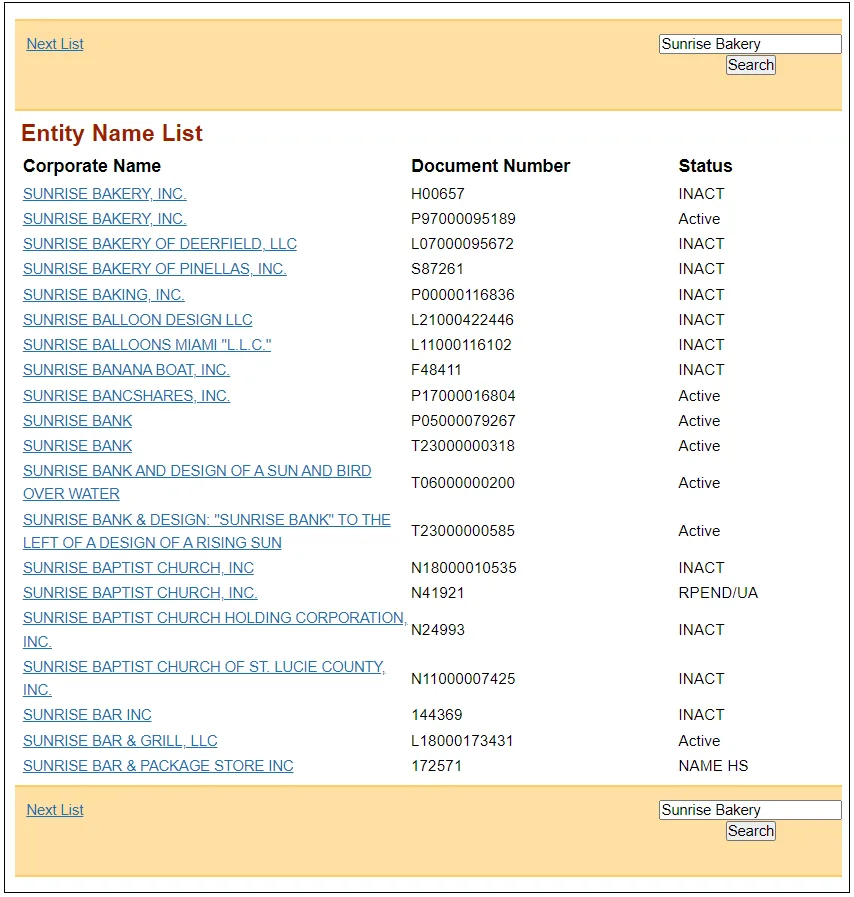
On the results page (Entity Name List), focus on these columns:
- Corporate Name (clickable link to open details)
- Document Number (your “ID” for the entity)
- Status (often shows as Active or short codes like INACT, RPEND/UA, NAME HS)
Navigation tip: The results page uses Next List (top and bottom) to move through alphabetical lists, and there’s also a search box on the right to re-run the search. Registering then costs a filing fee in Florida of $125.
Step 4 – Open the Entity’s Detail Page
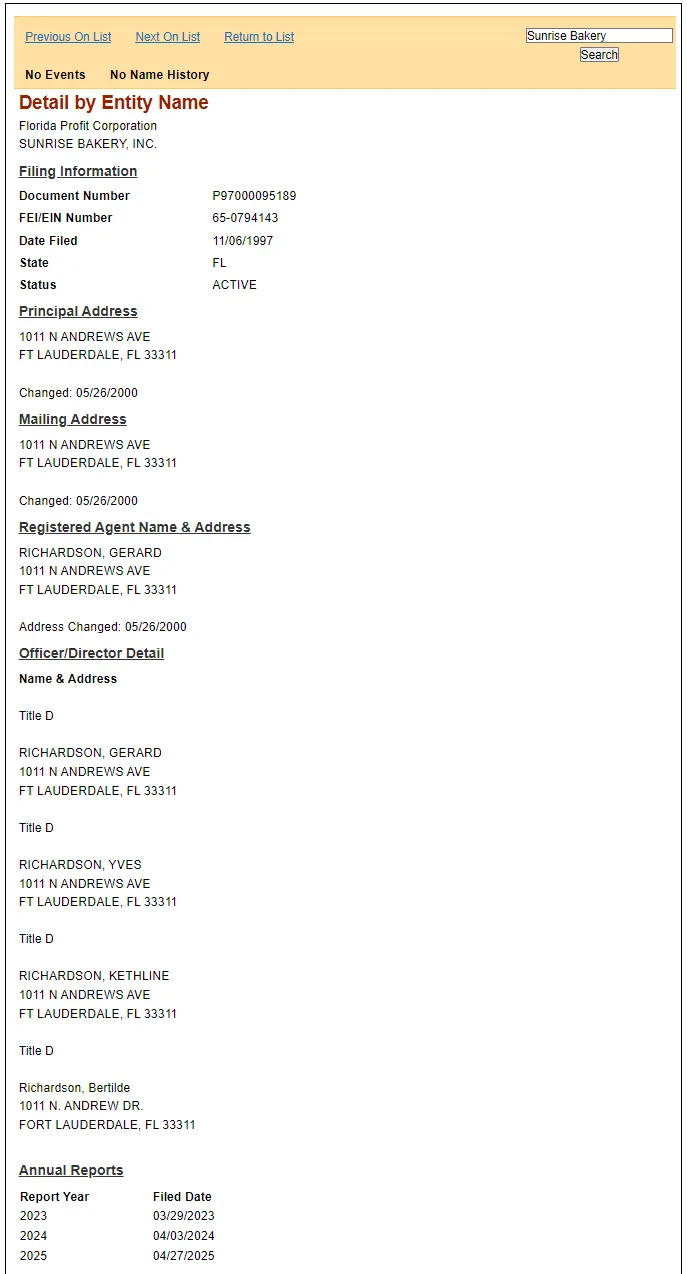
Click the Corporate Name to open Detail by Entity Name.
Due diligence checklist (matches what appears on Screenshot 3):
- ✅ Status (e.g., ACTIVE vs INACT, etc.)
- ✅ Document Number (save this)
- ✅ FEI/EIN Number (if shown)
- ✅ Date Filed (formation timeline)
- ✅ Principal Address + Mailing Address (and “Changed” dates if listed)
- ✅ Registered Agent Name & Address (and “Address Changed” date if listed)
- ✅ Annual Reports (Report Year + Filed Date)
Step 5 – Open Filed Documents (PDFs)
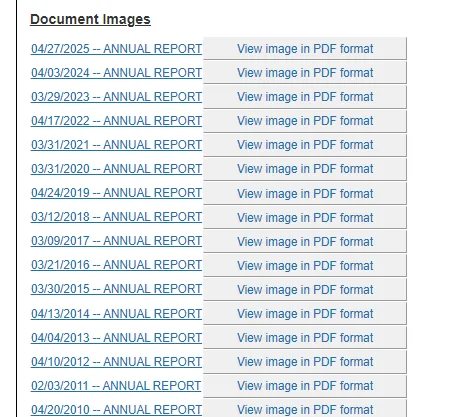
If the record has Document Images, click “View image in PDF format” to open the filed document.
How current is Sunbiz data? Florida says:
- Database records are updated daily
- Images of electronic filings appear within 3 business days after processing
- Images of non-electronic filings appear within 5 business days of examination
This matters if you’re checking a brand-new filing and don’t see the PDF yet.
Step 6 – Name Availability Checks that work (and ones that fail)
Florida doesn’t judge name availability by “looks different” at a glance, many small tweaks still count as the same name in state records. Use the examples below to avoid wasting time on changes Florida typically treats as not distinguishable, and focus instead on adding real, meaningful words that make your name clearly different.
Name ideas that don’t work (not distinguishable):
- Suffix-only changes: “Sunrise Bakery LLC” vs “Sunrise Bakery Inc.”
- Articles: “The Sunrise Bakery LLC” / “A Sunrise Bakery LLC”
- And vs &: “Sunrise & Bakery” vs “Sunrise and Bakery”
- Singular/plural/possessive: “Sunrise Bakeries” / “Sunrise Bakery’s”
- Punctuation/symbols: “Sunrise Bakery!” / “Sunrise-Bakery”
Name ideas that usually improve your chances:
- Add a distinctive coined term (“Juniper Sunrise Bakery”)
- Add a specific location/niche (“Sunrise Bakery of Tampa” / “Sunrise Bakery & Catering”)
- Add a unique brand word (“Sunrise Bakery Bluefin”)
Not a guarantee, your final approval depends on whether the name is distinguishable on the records, but this approach aligns with Florida’s “not distinguishable” list and reduces avoidable conflicts. Active entities must file the $138.75 annual report in Florida each year.
To generate branding ideas and avoid conflicts, reviewing LLC names examples can provide inspiration for a strong, memorable identity.
Verify Business Records with Confidence
Northwest Registered Agent provides expert support for entity searches and ensures your business stays compliant in Florida.
How to Read Florida Corporate Records (Status, Dates, Filings)
A Sunbiz entity detail page is best treated like a quick risk dashboard. To scan it fast, read it in this order: Status → Identity anchors → Compliance → Change history → Document timing.
Fast-scan table:
| What to check (top to bottom) | What it means | What to do next |
|---|---|---|
| Status | Whether the entity is active, or why it’s inactive (e.g., UA/MG/CV) | If inactive, identify why before assuming anything |
| Inactive/UA (Name Hold) | Inactive + name held for a statutory period | For name checks: treat as not available until the hold expires |
| Document Number | The entity’s unique Florida ID (best anchor) | Save it and use it for exact re-checks later |
| Date Filed vs Effective Date | Filed date vs legal effective date (can differ) | If timing matters (banks/contracts), confirm effective date is valid |
| Registered Agent + Registered Office | Who receives legal notices/service of process | Confirm agent identity + Florida street address matches what the business claims |
| Principal / Mailing Address | Where the entity is listed as operating / receiving mail | Match against contracts, invoices, website, or vendor paperwork |
| Annual Report years | Quick compliance signal (kept current vs gaps) | Gaps/repeated reinstatements = open filings and verify current standing |
| Annual Report deadline + late fee | Late fee risk and dissolution timeline | If you’re vetting: confirm current year filing; if you’re owner: file early |
| Filing history (“timeline”) | Amendments, mergers, conversions, reinstatements | Many rapid changes = dig deeper (why the changes happened) |
| Document images timing | Missing PDFs may just be posting delay | If filing is recent, wait within the posting window before assuming “not filed” |
Official Sunbiz Search vs. Professional Search Services
If you’re deciding whether to DIY your search or pay for help, here’s a practical comparison.
| Use case | Official Sunbiz Search (free) | Professional Search Services (paid) |
|---|---|---|
| Basic lookup (status, agent, addresses, filings) | ✅ Best option (official source) | ✅ Works too, but usually unnecessary |
| Name conflict check (Florida only) | ✅ Good starting point | ✅ Helpful if you need deeper screening or multiple states |
| Multi-state verification (several jurisdictions) | ❌ You must search each state separately | ✅ Saves time by pulling multiple states in one workflow |
| Higher-risk due diligence (complex ownership, litigation, liens, UCC, etc.) | ⚠️ Limited to state entity records | ✅ Often bundles broader data sources beyond entity registry |
| Speed/volume (many entities at once) | ⚠️ Manual and slower | ✅ Faster for bulk checks and reporting |
| Proof for banks/transactions | ✅ Use Certificate of Status from Florida | ✅ Services may assist, but certificate still comes from the state |
Register a Florida LLC After Checking the Name
Once your name looks distinguishable on Sunbiz, the priority is to file correctly the first time, save your document number + confirmation, then handle the operational items Sunbiz doesn’t cover (tax, licenses, banking, contracts). Every entity must also keep a FL registered agent on record.
Quick steps:
- Step 1 – Pick a Registered Agent
Choose an individual/company with a physical Florida street address and clear consent to serve. - Step 2 – Choose management structure
Decide member-managed vs manager-managed (this affects who has authority day-to-day). - Step 3 – Prepare your filing info
Have ready: LLC name, principal + mailing address, agent name + address, and member/manager details (as required). - Step 4 – File Articles of Organization (online or mail)
File online for speed, or mail if needed. Before submitting, re-check name spelling, agent address, and agent consent. - Step 5 – Save your proof
Keep your document number, confirmation email/letter, and your filed copy link (or saved PDF/image once posted). - Step 6 – Get an EIN (if needed)
Typical reasons: bank account, employees, tax filings, or if partners/vendors require it. - Step 7 – Set up the basics
Operating agreement, bank account, bookkeeping, and 1–2 core contracts (client/vendor/contractor). - Step 8 – Handle taxes + licenses (separate from Sunbiz)
Register taxes (if applicable) and check industry/local licensing (many are outside Sunbiz). - Step 9 – Stay compliant
Put the annual report window on your calendar, and update your agent/address promptly to keep status active.
For the complete walkthrough with screenshots, fees, timelines, and best practices, see How to Start a Florida LLC (Full Guide).
Best Practices & Common Pitfalls (Avoid Wrong Matches on Sunbiz)
Sunbiz is accurate, but it’s easy to click the wrong record when names are similar. The fastest way to stay correct is: search with core keywords (not the full legal name), then “lock” the right entity using Document Number + a 3-point match (status + agent + address). Florida’s own search guides confirm you can use partial names and that punctuation/full names aren’t required.
Best practices (faster + more accurate):
| Best practice | Why it works |
|---|---|
| Search using core keywords (short, partial is fine) | Florida’s guides say the entire name isn’t necessary and punctuation is optional, so shorter keyword searches reduce typos and improve matching. |
| After you find the right listing, save the Document Number | Document number is your most reliable “ID” for re-checking later (beats searching by name again). |
| Use a “3-point verification” before trusting a match: Status + Registered Agent + Address | Those fields together are far more unique than a name alone and help avoid wrong-entity mistakes. (Sunbiz records include these details on the entity record.) |
| If something was “just filed,” check Document Processing Dates | Sunbiz records update daily, but filings/images can lag processing; processing dates help you interpret “not visible yet.” |
| Treat “almost the same name” as a serious conflict during name checks | Florida law/Division guidance explains many “tiny differences” aren’t distinguishable (suffixes, articles, punctuation, etc.). |
Common pitfalls (and how to avoid them):
| Common pitfall | What to do instead |
|---|---|
| Confusing a DBA (fictitious name) with a legal entity | A fictitious name registration is not required to form an LLC/corp/LP, don’t treat it as proof of entity formation. Verify the actual LLC/corp record. |
| Assuming “Inactive” means the name is free | “Inactive/UA” can mean the name is held for a period, so it may still be unavailable. |
| Thinking punctuation/spacing/“& vs and”/LLC vs Inc makes it unique | Florida law says those differences are often not distinguishable, build uniqueness into the core words. |
| Mixing up licenses with entity registration | Sunbiz is the entity index; professional/industry licensing is often handled elsewhere, don’t assume “registered” means “licensed.” |
| Assuming “no PDF image” means “not filed” | Florida says records update daily, and images appear after processing (electronic vs non-electronic timing differs). Check timing + processing dates. |
Quick method for duplicates / near-identical names
When you see multiple similar results, compare these in order:
- Status (Active vs inactive type)
- Registered Agent name + Florida street address (often the fastest differentiator)
- Principal/Mailing address (match to contracts/invoices/website)
- Save the Document Number of the correct entity for future checks
Florida Business Entity Search FAQ
Below is a concise FAQ answering the most common questions about performing a florida business entity search and related procedures. These direct, fact-based responses can be instrumental in helping entrepreneurs and established business owners alike navigate Florida’s entity lookup system.
What is the Florida SOS business search and how does it work?
Florida’s SOS business search (Sunbiz) is the official Search Records database run by the Florida Department of State, Division of Corporations—Florida’s business entity index. It lets you look up entities (LLCs, corporations, LPs, partnerships) and related records by name, officer/registered agent, document number, FEI/EIN, ZIP code, or street address. Records are updated daily, and filing images may post a few business days after processing.
How can I verify a business name and access its official records in Florida?
Use Sunbiz Search by Name to check whether your proposed name conflicts with existing records (availability is about being distinguishable, not a simple “available” label). Open the matching record to review status, document number, date filed, registered agent, addresses, annual reports, and any document images. If you need formal proof for a bank or contract, order a Certificate of Status (often treated as “good standing” proof).
Where can I find detailed information on Florida business licenses and permits?
Sunbiz is for entity registration, not licensing. For licenses/permits, start with Florida’s “Know Before Starting” guidance: many professions register with DBPR, and businesses may also need local county/city requirements (often called occupational licenses / local business tax receipts). For Florida tax registration (sales tax, reemployment tax, etc.), use the Florida Department of Revenue’s Florida Business Tax Application wizard.
What are the steps to register a new business entity in Florida?
After you’ve checked for name conflicts, file your formation document with the Division of Corporations: Articles of Organization (LLC) or Articles of Incorporation (corporation). You’ll need a registered agent and required addresses. For a Florida LLC, the state’s required formation fees total $125 ($100 filing + $25 registered agent designation). After approval, save your document number and keep up with ongoing filings (like annual reports) and any tax/license registrations outside Sunbiz.
How do I choose a registered agent for my Florida business?
Pick a registered agent who can reliably accept service of process and official notices. Florida’s LLC instructions are clear: the agent can be an individual or legal entity, an active Florida entity may serve, but the LLC cannot be its own agent. The agent must have a physical Florida street address (no P.O. Box) and must accept/sign the appointment (typed signature for online filings). Choose someone dependable, missing legal notices can create real problems.
- Florida Department of State: Explanation of Status Terms (Active, INACT/UA, etc.)
- Florida Legislature (Online Sunshine): F.S. 605.0112 – LLC name requirements & “not distinguishable” factors
- Florida Legislature (Online Sunshine): F.S. 607.0401 – Corporate name requirements & “not distinguishable” factors
- Florida Department of State: LLC Fees (filing fee, annual report fee, late fee)
- Florida Department of State: File Annual Report (deadline + late fee)
- Florida Department of State: Document Processing Dates
- Florida Department of State: Florida Fictitious Name Registration (DBA)
- Florida Legislature (Online Sunshine): F.S. 865.09 – Fictitious Name Act
Looking for an overview? See Florida LLC Services
Simplify Your Florida Business Registration
Harbor Compliance makes it easy to search for business records, check compliance status, and manage filings.