Virginia Business Search (VA SCC CIS): LLC & Corporation Lookup

| Updated March 17, 2026

A VA SCC business search lets you look up official Virginia entity records through the Virginia State Corporation Commission (SCC), including LLCs, stock corporations, and other registered entities. It’s the fastest way to confirm whether a name is already in use, pull the SCC Entity ID, and verify an entity’s status before you file, sign a contract, or do due diligence. You can also use the same system to locate the registered agent, view key filing details, and request official certificates when a bank or vendor needs proof. In this guide, I’ll show you the exact links and what the SCC database can (and can’t) confirm.

📘 VA SCC Business Entity Search – Official Links, Key Facts & Why This Matters (Virginia)
Quick links (official)
Business Entity Search (CIS)
⤷ Use this VA SCC entity search to look up by entity name, SCC Entity ID, or principal/agent name; open the entity record to verify status & details.
Name Availability Check (CIS)
⤷ Pre-check a proposed name before filing; run a few close variations to avoid “too similar” issues.
Reserve a Name (How-To PDF)
⤷ Walkthrough for reserving a business entity name online in CIS.
Order Certified Copies & Certificates
⤷ Request certified copies and certificate documents from the Clerk’s Office (official proof for banks/vendors).
Certificate of Fact (LLCs) (How-To PDF)
⤷ Step-by-step CIS guide to request a Certificate of Fact of Existence/Registration for an LLC.
Contacts – SCC Clerk’s Office (Business Records)
Call Center: (804) 371-9733 · Toll-free (VA): (866) 722-2551
Address: 1300 E. Main Street, Richmond, VA 23219 (Office of the Clerk)
Key facts (Virginia)
  • Best “source of truth”: For Virginia entities, the SCC’s Clerk’s Information System (CIS) is the official database for search and record checks.
  • What you’ll typically confirm: SCC Entity ID, entity type (LLC/stock corporation/business trust, etc.), formation date, registered agent, and entity status.
  • Name screening: Use the Name Availability Check for early screening, but final acceptability is still determined when the SCC reviews your filing.
  • Certificates & copies: CIS supports official certificate requests and certified copies for proof of existence/registration when third parties require documentation.
  • Due dates vary by entity: Some records include an annual report or annual fee due date (depending on whether it’s an LLC vs. corporation).
  • What you won’t find: CIS is not an EIN database, and it won’t replace trademark checks or local licensing research.
Why this search matters
  • Pre-clear a name before you pay filing fees (and reduce the risk of rejections for close matches).
  • Verify status + registered agent for contracting, compliance, service of process, and basic due diligence.
  • Pull official proof (certificates/certified copies) when a bank, lender, marketplace, or vendor requests documentation.

Understanding the Virginia Business Entity Search Tool

When you’re forming a company or verifying an existing one, you need fast, reliable basics like the formation/registration date, entity status, and the SCC Entity ID. That’s exactly what the Virginia entity search in the Virginia State Corporation Commission (SCC) system is built for. Using the SCC’s official Clerk’s Information System (CIS) helps you confirm key record details, screen names for conflicts, and avoid costly mistakes based on outdated or third-party data.

What Is the Virginia SCC Business Search Portal?

Virginia’s official lookup portal is the SCC’s Clerk’s Information System. It lets you search by entity name or SCC Entity ID, and you can usually narrow results using partial-name matches when you’re not sure of the exact spelling. Once you open an entity record, you can verify essentials like the business’s current status, entity type, formation/registration date, and registered agent/registered office details (plus other record fields the entity has on file).

You may also see it referred to as the Virginia State Corporation Commission entity search, since CIS is the SCC’s official lookup system.

Why Use the Business Search Tool: Key Benefits for Entrepreneurs

Using the SCC business search gives you a practical edge in common business situations:

  • Prevent name conflicts:
    Screen a proposed name and spot close matches before you file.
  • Verify status and basic compliance:
    Confirm the entity is active and in good standing for your purpose.
  • Find official record contacts:
    Identify the registered agent and related office address details for service of process or paperwork (and if you’re comparing options, see our guide to the best registered agent in Virginia).
  • Reduce risk in deals:
    Confirm the company exists in Virginia and matches the entity you intend to work with.

Common Scenarios Requiring a Business Entity Search

This tool comes up in real workflows all the time, whether you are running a Virginia LLC search, doing a quick Virginia LLC lookup by Entity ID, or verifying a vendor before signing a contract. It’s also helpful when you need the SCC Entity ID for filings, certificate requests, banking, or compliance tasks. A quick search up front can save you time and prevent avoidable back-and-forth later.

Start your Virginia LLC with ZenBusiness

Once you’ve checked name availability in the Virginia SCC database, ZenBusiness can take the next step for you. They’ll handle your Virginia LLC formation paperwork, secure your business name, and help you stay compliant with state requirements – all in one simple platform.

How to Conduct a Business Search in Virginia

A Virginia business search is easiest when you follow a repeatable workflow: open the official SCC database, search by name (and a few close variations), then confirm the correct record details before you move forward. The steps below include suggested screenshots so you can follow along and confirm you’re seeing the same screens as you go.

Step 1: Open the official Virginia SCC Business Entity Search page

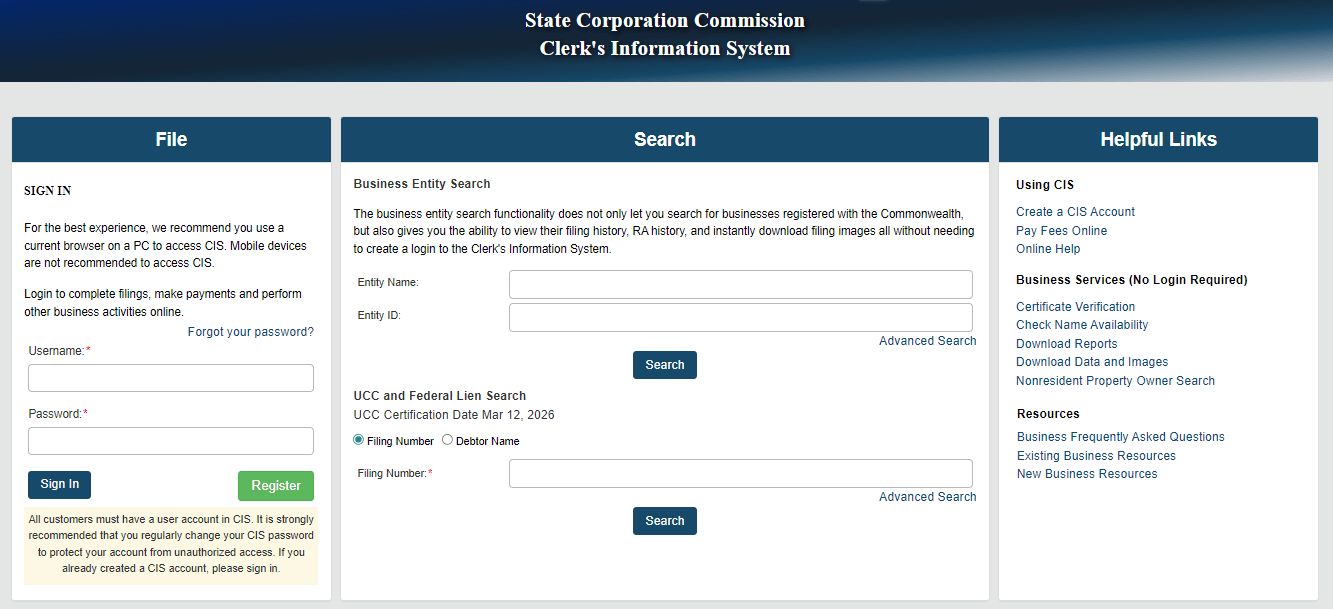
Go straight to the Virginia SCC’s Clerk’s Information System and land on the Search screen. On this page, you’ll see the Business Entity Search box with two main fields: Entity Name and Entity ID, plus an Advanced Search link for more filters. This is the official starting point for looking up Virginia entities and accessing record details.

Virginia SCC CIS business entity search page

Think of this as Virginia’s official Virginia entity search screen, since it is the entry point for finding SCC records by name or Entity ID.

Step 2: Choose the match type and enter the business name

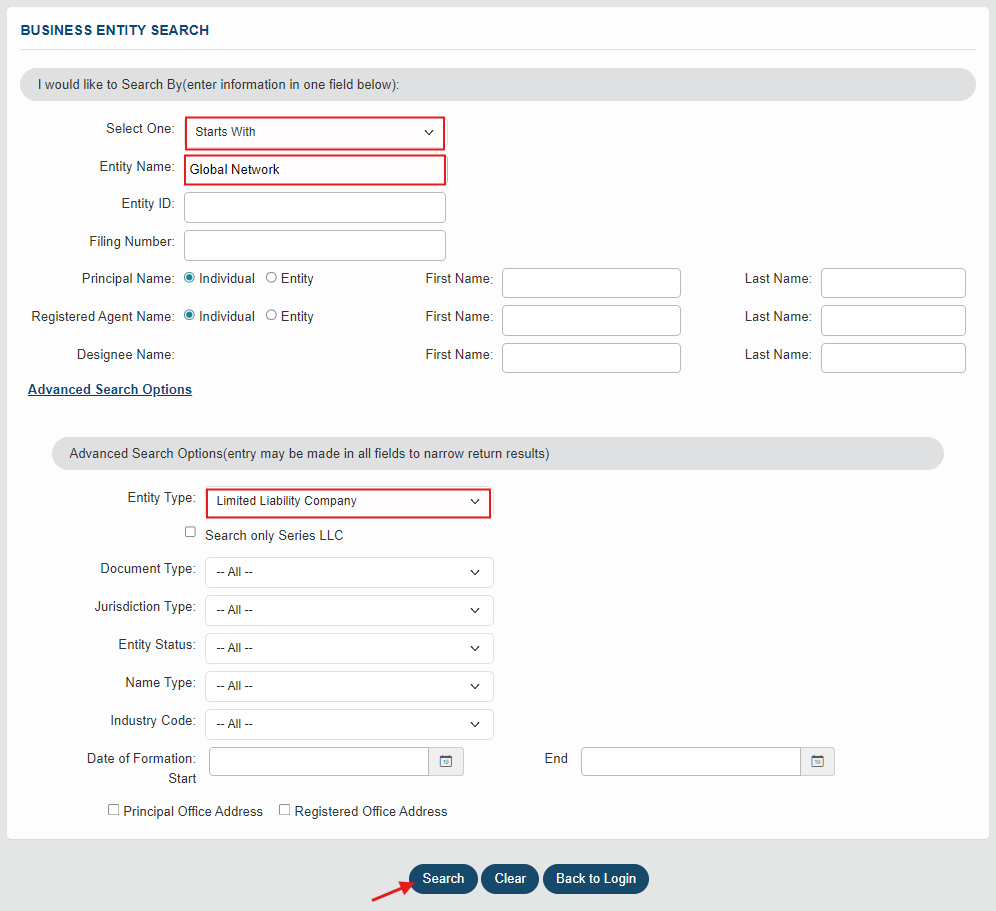
Before you type anything, notice the instruction at the top: “enter information in one field below.” In practice, CIS gives you a few different ways to search, so you can pick the field that matches what you already know:

  • Entity Name (most common):
    Use this when you’re screening a new name or verifying a business by name.
  • Entity ID (fastest + cleanest):
    Use this when you already have the SCC Entity ID and want the exact record. If you already have the ID, this VA SCC search is the fastest way to pull the exact record without sorting through name variations.
  • Filing Number:
    Useful if your paperwork references a filing number instead of an Entity ID.
  • Principal Name / Registered Agent Name:
    Helpful for verification when you don’t know the exact entity name (you can also toggle Individual vs Entity depending on what you’re searching).
  • Designee Name:
    Used in specific cases; most readers can ignore this unless they know they need it.

Now, for name searches, use the Select One dropdown to control how broad your results are:

  • Starts With → best “stem test” (tight screening for close prefixes).
  • Contains → broader sweep (good for multi-word names, partials, and catching longer strings that still include your core phrase).
  • Exact match → best when you know the full legal name and want a narrower list.
Match options in Virginia SCC CIS search

Best-practice input tips (keeps results cleaner):

  • Start with the core name (skip commas/periods and drop “The” at first).
  • Then rerun using Contains if you want to catch longer or rearranged names.
  • If you need a precise comparison, rerun with the designator included (LLC, L.L.C., Inc., Corp.).

Example input:

Choose Starts With, then type “Global Network” in Entity Name.
If you want to narrow to LLCs only, open Advanced Search Options and set Entity Type = Limited Liability Company, then click Search.

Virginia SCC CIS search with match type and “Global Network” entered

Step 3: Review the results list and open the correct entity record

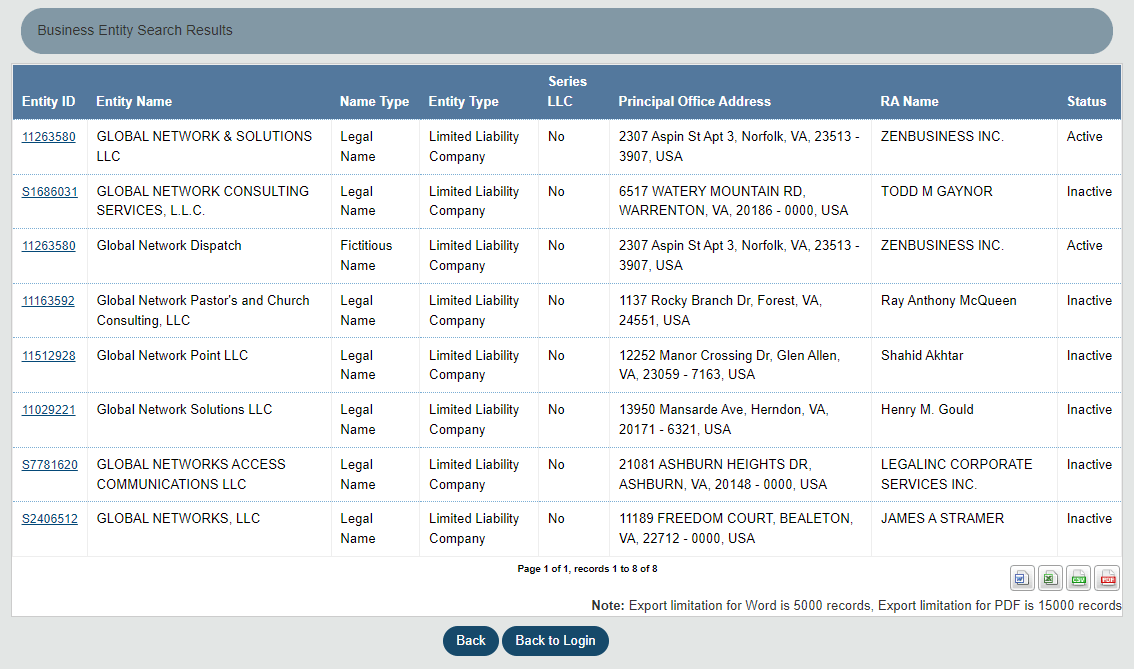
After you click Search, CIS shows a results table with columns that let you triage matches quickly before you open anything. In most cases, focus on these columns first:

  • Entity Name: look for the closest match to your proposed name (watch for the same “stem” plus generic add-ons like Solutions, Services, Group, etc.).
  • Name Type: helps you tell whether you’re looking at a Legal Name vs a Fictitious Name entry.
  • Entity Type: confirms whether the record is an Limited Liability Company (LLC) or a different entity type.
  • RA Name: the registered agent name, useful for verification when multiple results look similar.
  • Status: scan for Active vs Inactive so you can separate current entities from older records.

Example (based on the “Global Network” search):
In the list, you can immediately see multiple close variants (e.g., GLOBAL NETWORK & SOLUTIONS LLC, GLOBAL NETWORKS, LLC, Global Network Dispatch). At this point, your job is to identify which record is most relevant to your search goal – name screening (spot close conflicts) or verification (confirm one specific company).

Virginia SCC CIS search results list

How to tighten your list:

  • Filter to the real competition (Advanced Search Options):
    Set Entity Type = Limited Liability Company and Status = Active to focus on live LLCs first.
  • Flip the match mode:
    Run Starts With to screen the stem fast, then rerun with Contains to catch longer/partial variants.
  • Probe variants that matter:
    Test 2–4 realistic versions (plural, descriptors, and a distinctive lead word).
  • Open promising records:
    Click the Entity ID to confirm Status, Entity ID, Registered Agent, and key dates before you decide it’s “too close” or “clear.”

“Global Network” sample (quick screening guide):

Candidate name Verdict Why / How to fix
Global Network LLC ❌ Likely conflict Identical stem to multiple results; expect close matches. Add a distinctive lead word.
Global-Network LLC ❌ Cosmetic Hyphen/spacing doesn’t create meaningful distinction.
Global Networks LLC ❌ Often cosmetic Plural/singular is usually too close when the stem is the same.
The Global Network LLC / Global Network Co., LLC ❌ Cosmetic “The,” “Co./Company” typically don’t help distinctiveness.
Global Network Virginia LLC / Global Network VA LLC ⚠️ Often weak Geographic add-ons can still be too close if the stem is unchanged.
Northstar Global Network LLC ✅ Often works (screening) Distinctive lead word makes the overall name more separable.
Global Network Waterfront Analytics LLC ✅ Often works (screening) Specific descriptor can reduce overlap vs simple stem-only names.
Riverstone Global Network Studio LLC ✅ Often works (screening) New coined lead + specific descriptor tends to screen cleaner.

Step 4: Open the Entity Information page and confirm the “must-check” fields

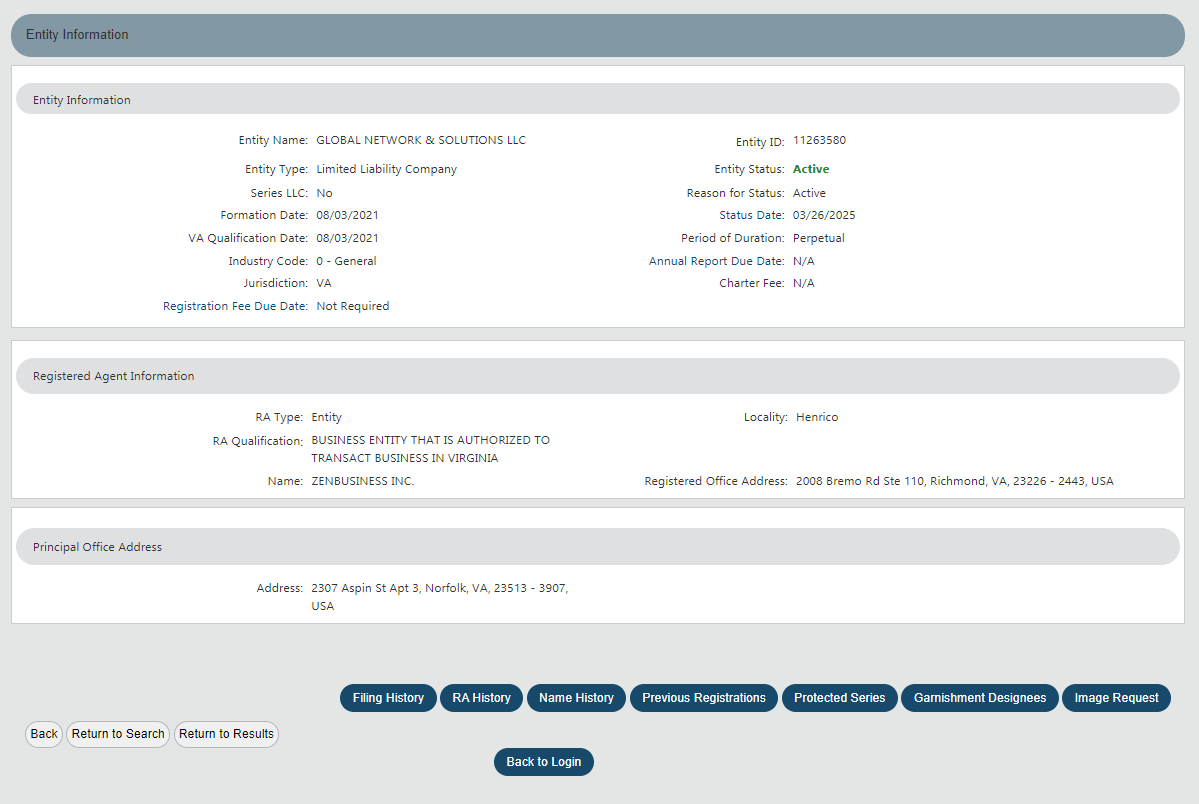
When you click a result, CIS opens the Entity Information page. This is where you confirm you’ve got the right record and capture the details that matter for name screening or verification.

Start in the “Entity Information” box (top section) and verify:

  • Entity Name (make sure it matches the exact business you intended to review)
  • Entity ID (the most reliable identifier for future lookups)
  • Entity Type (e.g., Limited Liability Company vs other types)
  • Entity Status + Status Date (quick “is it currently active?” check)
  • Formation Date (and VA Qualification Date if shown)
  • Jurisdiction (e.g., VA)
  • Optional fields that can help for context: Series LLC, Period of Duration, Annual Report Due Date, Registration Fee Due Date

Then check “Registered Agent Information” (middle section):

  • RA Type (Individual vs Entity)
  • Registered Agent Name
  • Registered Office Address + Locality
    This is useful when multiple entities have similar names, you can often confirm you’re looking at the correct company by cross-checking the registered agent details. Virginia’s Registered Agent Statute requires entities to keep this information on file, which is why this section is one of the quickest verification points in CIS. Many readers also use this step as a quick Virginia registered agent search, since CIS shows the agent name and registered office on the record.

Finally, confirm the “Principal Office Address” (bottom section):

  • Use this as a supporting detail, but for verification purposes the Entity Status + Entity ID + Registered Agent are usually the most important “core trio.”

Useful buttons on this page (when you need more than the summary):

  • Filing History → see the filing timeline (good for due diligence)
  • Image Request → request/download filing images (when available)
  • Name History / RA History → track prior names or registered agent changes
Virginia SCC CIS entity details showing status and Entity ID
💡 Our advice
On this page, confirm the SCC Entity ID and Entity Status first. If it appears for that entity type, note the Annual Report Due Date for compliance tracking.

Step 5: Save proof and next-step documentation (optional, but smart for due diligence)

If you’re doing this search for banking, vendor onboarding, or a contract, it’s worth saving a little “paper trail” while you’re on the CIS screens. That way, you can quickly prove what you checked (and when) without having to redo the search later.

What to save (the 3 easiest proofs):

  • Entity Information summary (shows Entity ID, status, and key dates)
  • Registered Agent section (shows the RA name and registered office address)
  • Filing History (optional) if you need a quick snapshot of recent filings or changes

How to capture it cleanly:

  • Take screenshots that clearly show the entity name + status and at least one unique identifier (usually the Entity ID).
  • If you’re sharing internally, consider blurring addresses if your team doesn’t need them.

If a third party asks for official proof (not just a screenshot), use the certificate/copies request flow in CIS (this is common for lenders, marketplaces, and enterprise vendors).

Form a Virginia LLC with Northwest Registered Agent

Ready to use the name you just searched? Northwest Registered Agent can help you form your Virginia LLC, file the paperwork with the SCC, and keep your business compliant from day one – while protecting your privacy.

Field Note: Aaron Kra's Virginia SCC CIS workflow

When I run a Virginia SCC CIS search, I treat it as a repeatable verification routine. I start with Entity Name, rerun with a broader match if needed, and then open the Entity Information page to confirm the core trio: Entity ID, Status, and Registered Agent.

  • Name screening: I test the stem first (for example, “Global Network”), then try 2 to 4 meaningful variants. Cosmetic tweaks usually do not solve a close stem conflict.
  • Results triage: I scan Status and Entity Type first to separate active LLCs from older or inactive noise before clicking through.
  • Documentation: I save 2 proof screenshots: (1) the results list with status visible, and (2) the entity page showing Entity ID and status.
Quick reminder
If my goal is “is this name available?”, I use the dedicated Name Availability Check in CIS as the final screening step, not the general results list alone.

Checking Business Name Availability in Virginia (when you’re choosing a new name)

If you’re choosing a new LLC or corporation name, start with the SCC’s dedicated Name Availability Check in CIS. That’s the tool Virginia uses to screen whether a proposed name is allowable before you file. Running this check early helps you catch close conflicts, avoid last-minute rejections, and reduce the risk of building a brand around a name you can’t register. If the name looks clear, you can also reserve it while you prepare your filing (the reservation period is 120 days under Virginia law).

Importance of Name Availability Before Starting a Business

Name conflicts are one of the easiest ways to lose time during formation, especially if your desired name is only “slightly different” from an existing record. Virginia’s standard is whether the name is distinguishable on the SCC’s records, and endings like “LLC” or “Inc.” typically don’t make a name unique by themselves.
A quick check upfront also keeps your brand consistent across your website, invoices, and marketing channels, since you’re less likely to be forced into a late rename.

If you want a broader, repeatable screening workflow (beyond Virginia), see our guide on how to check an LLC name the right way.

How to Search for Available Names Using the SCC Portal

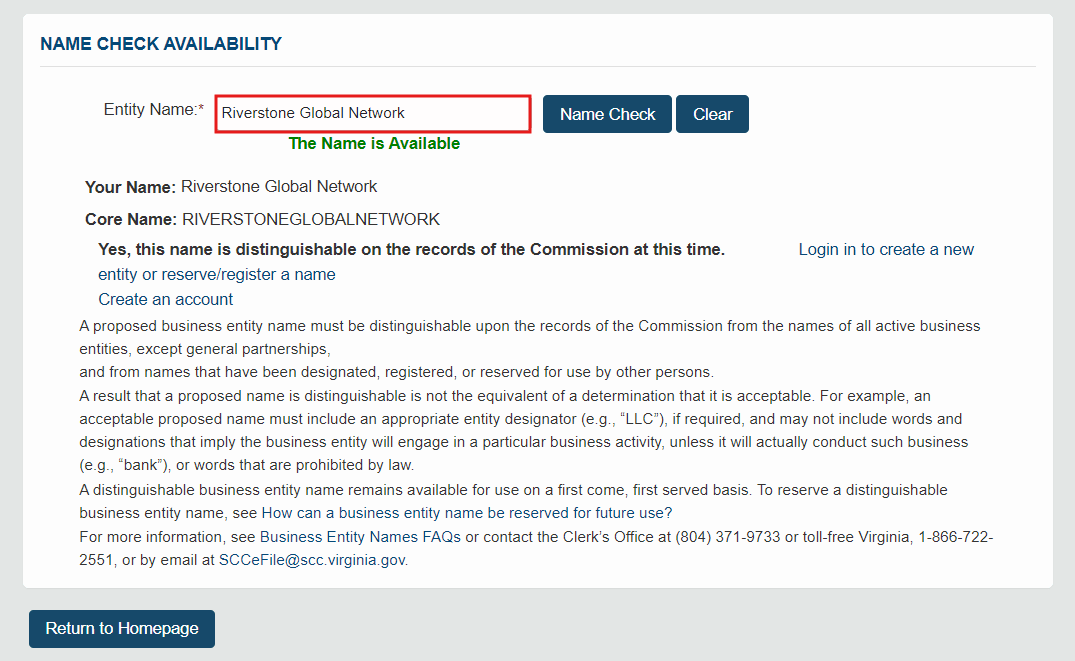
Use the SCC’s Name Availability Check and test your name in a few practical passes:

  • Run the core name first (no punctuation, no designator).
  • Try 2–3 close variations (spacing, “and” vs “&”, singular/plural).
  • Open any close matches and compare the “stem” of the name (don’t assume you’re safe because the ending is different).
Virginia SCC CIS name availability result

If you’re forming an LLC, remember Virginia requires the LLC name to include “limited liability company” / “limited company” or an approved abbreviation like LLC or L.L.C. And if you want inspiration while you iterate, see these LLC name examples that still sound brandable.

Steps to Reserve a Business Name in Virginia Online

If your name looks available and you want to hold it while you prepare the filing, you can reserve it in CIS:

  1. Log in to CIS and click Online Services.
  2. Under Business Entities, choose Name Reservations/Registrations/Fictitious Name.
  3. Select Application for Reservation of Name, enter the proposed name, then click Check Availability.
  4. If it shows the name is available, continue, add contact details, then add the application to your cart and check out.
  5. Save the confirmation for your records—Virginia’s reserved-name period is 120 days, and renewals are handled during the 45-day window before expiration.

Rules and Restrictions for Naming a Business in Virginia

Virginia naming rules vary by entity type, but a few points come up often:

  • Use the correct designator for your entity type (for LLCs, Virginia law specifies the required LLC wording/abbreviations).
  • Your name can’t imply a different entity type (for example, an LLC name shouldn’t suggest it’s a corporation).
  • The SCC focuses on whether the name is distinguishable on record, and required designators generally aren’t counted as meaningful differences.

Next Steps: Registering a Business in Virginia After Your Search

Now that you’ve confirmed your name and reviewed the Virginia SCC record details, the next steps are straightforward. Use this quick checklist to move from “search” to “officially registered” without turning this page into a full formation guide.

  • Pick your final name (and do one last conflict screen)
    Re-run the SCC name check with your exact wording, plus a couple of close variations, to reduce the risk of a “too similar” issue.
  • Decide what you’re forming (LLC vs corporation)
    Your choice affects taxes, paperwork, and ongoing requirements (make sure the structure matches how you’ll actually operate).
    If you’re forming a corporation, your structure and rules generally fall under the Virginia Stock Corporation Act, so it’s worth confirming you are choosing the right entity type before filing. And if you are researching corporations instead, the same CIS tool also works as a Virginia corporation search (often searched as a VA corp search).
  • Prepare your filing details
    For an LLC, this usually means preparing the details you’ll enter in the Articles of Organization, including registered agent and principal office information.
  • File your formation document with the SCC
    Submit your official formation filing (online is typically the fastest) and save your confirmation/receipt for your records.
  • Handle the basics right after approval
    Draft an operating agreement (recommended), get an EIN if needed, and set up banking and any local/state registrations that apply to your business.
  • Plan for ongoing compliance
    Make a note of annual fees/filings, keep your registered agent info current, and update the SCC record if key details change.

If you’re planning to move forward as an LLC (which is the most common next step after a business search), follow our step-by-step guide here: form a Virginia LLC with confidence. And if budget is your main concern, this guide can help you keep costs low: how to form a cheap LLC without cutting corners.

Frequently Asked Questions About VA Business Search

The Virginia SCC business search tool helps entrepreneurs confirm company details, check name availability, and verify whether an entity is active in the state. Below are answers to common questions about how the Virginia business entity search works and what information you can find.

Is the Virginia SCC Business Search free and open to the public?

Yes. The Virginia SCC’s Clerk’s Information System (CIS) business entity search is free and publicly accessible. You can search by entity name or SCC Entity ID and view basic entity record details (this is the official place many people mean when they search “Virginia Secretary of State business search”).
Basic lookups are free, but official proof documents (like certificates and certified copies) can require a fee. For example, SCC certificate documents are listed at $6 each.

How Often Is the SCC Business Database Updated?

CIS updates as filings are processed by the SCC, so new formations and changes may not appear instantly. In many cases, updates show up within a few business days, but timing can vary during heavier filing periods. If something recently filed isn’t appearing yet, use the SCC contact options or reference your filing confirmation.

What Information Can I Find About an LLC in Virginia?

A Virginia LLC record typically shows:
– Legal entity name
– SCC Entity ID
– Entity type (e.g., Limited Liability Company)
– Status (active/inactive-type statuses)
– Formation/registration date
– Registered agent name
– Registered office address
– Principal office address (if listed)

What Should I Do If My Virginia Business Name Search Shows No Results?

If you get no results:
– Recheck spelling and try the core name (drop punctuation and “The”).
– Switch match scope (try Contains if Starts With is too narrow).
– If your goal is true name screening, use the SCC’s dedicated Name Availability search in CIS (built for allowability checks).
– If the business was filed very recently, allow a few business days for processing and posting.

How Do I Find a Business Registered in Another State but Operating in Virginia?

Search CIS using the company’s legal name. If it’s operating in Virginia legally as an out-of-state company, it may appear as a foreign entity in SCC records (often with a Jurisdiction field and a Virginia qualification/registration date on the entity page). If it doesn’t appear in Virginia, check the official business search portal in the state where it was originally formed, then confirm whether it needs to register as a foreign entity in Virginia before doing business.

References

Form a Virginia LLC with Harbor Compliance

After confirming your business name in the Virginia SCC search, Harbor Compliance can help you officially form your Virginia LLC. Their service handles state filings, compliance tracking, and registered agent requirements so you can launch your business with confidence.

  • Aaron Kra Boost Suite

    Aaron Kra, JD, Founder and Editor-in-Chief of Boost Suite, is a recognized authority on LLC formation, registered agents, and small-business compliance.
    A graduate of the University of Texas School of Law (ABA-accredited), he founded Boost Suite to turn complex state rules into plain-English, step-by-step guidance. For 9+ years, he has helped entrepreneurs with entity selection, registered-agent requirements, and multi-state compliance, and he leads the site’s legal/tax review.


    Previously, Aaron practiced business law in Austin (LLC/PLLC formations, conversions/domestications, UCC-1 filings, multi-state registrations) and completed a year-long secondment with a national registered-agent provider, working with filing clerks in 25+ states. At Boost Suite, he checks each guide with official US sources and updates everything when necessary. Read moreAUTHTOROIRN about Aaron Kra and Boost Suite.

Disclaimer: The information provided on this page is for general educational purposes only and should not be considered legal or tax advice. Laws and regulations differ by state or country, may change over time, and always depend on your personal circumstances. The comments section is designed for readers to share insights and personal experiences, but these do not replace professional guidance. For personalized advice regarding legal or tax matters, please consult with a licensed attorney, CPA, or qualified advisor. To learn how we select partners, vet sources, and keep content accurate, see our editorial policy.

Leave a Comment