Wisconsin Business Search: How to Look Up a Business in WI

| Updated April 21, 2026

If you want to look up a business in Wisconsin, use the official Wisconsin Department of Financial Institutions (DFI) Corporate Records Search. Even though many people search for “Wisconsin SOS Business Search,” Wisconsin business entity records are handled by the DFI, not the Secretary of State. You can use the tool to check registered business details and run a preliminary name search before filing.

📘 Wisconsin Business Search – Quick Links, Key Facts & Why This Matters
Quick links
Corporate Records Search
⤷ Look up Wisconsin business entities filed with DFI.
Advanced Search
⤷ Use extra filters when a basic name search returns too many matches.
Name Availability Search
⤷ Run a preliminary business name search before you file.
Annual Report Filing
⤷ File your Wisconsin annual report online through DFI.
Request Certificate of Status
⤷ Order an online Certificate of Status when a bank or partner asks for proof.
Contacts – Division of Corporate and Consumer Services
Address: 4822 Madison Yards Way, North Tower, Madison, WI 53705
Key facts
  • Official office: Wisconsin business-entity records are handled by the Department of Financial Institutions, not the Secretary of State.
  • Name search is only preliminary: final availability is confirmed only after DFI examines and accepts the filing.
  • Domestic annual reports: due in the quarter of the anniversary date, March 31, June 30, September 30, or December 31.
  • Foreign annual reports: due by March 31 each year after registration.
  • Useful fees: online Certificate of Status is $10; name reservation lasts 120 days and costs $15 for LLCs, business corporations, cooperatives, and LLPs, or $10 for LPs and nonstock corporations; optional expedited service is $25.
Why this search matters
  • Check whether your preferred business name is likely usable before you file formation documents.
  • Verify entity status, registered agent, and public record details before signing contracts or sending legal notices.
  • Order a Certificate of Status and stay on top of annual report deadlines to avoid delinquency issues.

What the Wisconsin Business Search

The Wisconsin business search is the public Corporate Records Search maintained by the Wisconsin Department of Financial Institutions, or DFI. It helps you check whether an entity is on record in Wisconsin, review its public filing history, and see details such as status, status dates, registered agent, and registered office. It is useful for checking public records, but it is not a certification that a business is operating legally.

The tool is also not the right place to expect full ownership data. Wisconsin DFI says business entities are not required to reveal ownership information to the department, and corporations disclose officers and directors, not shareholders.

Why People Use the Wisconsin Business Search

Most people use the search to confirm that a business exists, review its public record, check its status, or run a preliminary name search before filing. This is especially helpful if you want to compare similar names, verify the registered agent, or review entity history before signing a contract or submitting formation documents.

One important limit is that a name search is only preliminary. Wisconsin DFI says no name should be treated as available until the filing or name-change amendment has been examined and accepted by the department.

Who Can Use the Wisconsin Business Entity Search?

Anyone can use the Wisconsin business entity search because it is publicly available online through the DFI search portal. In practice, it is useful for founders, attorneys, lenders, vendors, investors, and anyone who wants to verify a Wisconsin entity’s public record before doing business with it.

Which Businesses Appear in the Wisconsin DFI Database?

Wisconsin DFI files a wide range of business entity records. The main entity types include the following:

  • business corporations
  • nonstock corporations
  • cooperatives
  • limited partnerships
  • limited liability companies
  • limited liability partnerships
  • general partnerships with optional registration
  • common law trusts
  • foreign entities of those same types
  • unincorporated cooperative associations
  • veterans organizations
  • certain religious corporations
📝 To be noted
LLCs, corporations, partnerships, cooperatives, trusts, and foreign entities can appear in the DFI database, but a sole proprietorship tradename filing is not the same as registering a Wisconsin business entity.

ZenBusiness Search Wisconsin Business Names

ZenBusiness helps you verify name availability and navigate the Wisconsin Department of Financial Institutions database.

How to Conduct a Wisconsin Business Search (Step-by-Step Guide)

If you want to look up a business in Wisconsin, start with the Wisconsin DFI Corporate Records Search. The search helps you find public business-entity records filed with the Department of Financial Institutions, but it should be treated as a record-checking tool, not proof that a business is operating legally.

Step 1: Open the Wisconsin DFI search portal

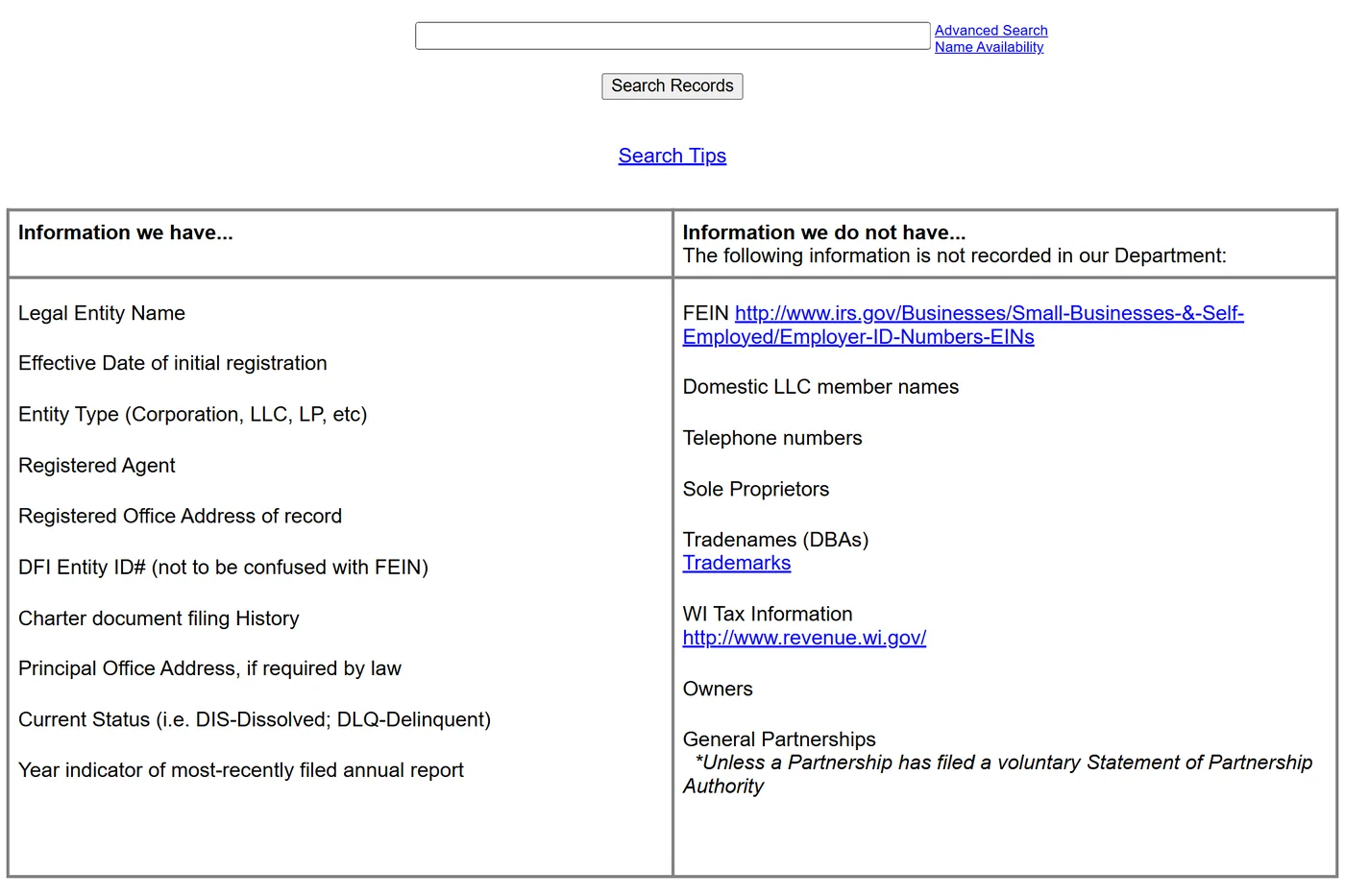
Go to the official Wisconsin DFI Corporate Records Search page. From there, you can search using several methods, including entity name, registered agent, registered office address, and DFI Entity ID number.

steps create llc online

Step 2: Choose the search method that fits your information

Different paths let you focus on the exact information you need. If you only know the business name, type it in to see matching entities. Alternatively, use the entity number or agent name to streamline your process. Select the most suitable approach to narrow your results.

Business Name Search

For those seeking a basic Wisconsin business name search, simply type in the exact phrase search or partial search name. The system will pull any matching results, displaying details on formation date and status. If multiple records come up, be sure to compare addresses or ID numbers to identify the correct listing.

Entity ID Search

If you have a unique filing ID, inputting it here can retrieve the right listing in seconds. Additionally, if you need to identify a business through its tax records, you can find a company with EIN using an official lookup tool. This company search tactic is useful if you already know the identification number assigned by the department of financial institutions, reducing the chance of confusion with similarly named companies.

Registered Agent Search

Use this approach if you know who represents the business for legal or official correspondence. Searching by registered agent is especially helpful if the same person or office manages multiple filings, letting you explore each entity tied to that agent’s name. Detailed results often show the principal office address or other compliance notes. the company’s official name, rely on the name-based lookup to zero in on possible matches.

steps create llc online

Step 3: Enter Your Search Terms and Narrow the Results

Enter the business name, DFI Entity ID, registered agent, or registered office, depending on what you know. If you are searching by name, Wisconsin DFI recommends starting with the name without endings like LLC or Corp. For example, instead of typing “Badgerland Management LLC,” start with Badgerland Management or even Badgerland if you want a broader partial search. If the first search is too narrow or returns nothing, broaden it. If it returns too many matches, use the Advanced Search and switch to an exact phrase search or add filters such as entity type.

steps create llc online

Step 4: Compare the Results and Open the Correct Record

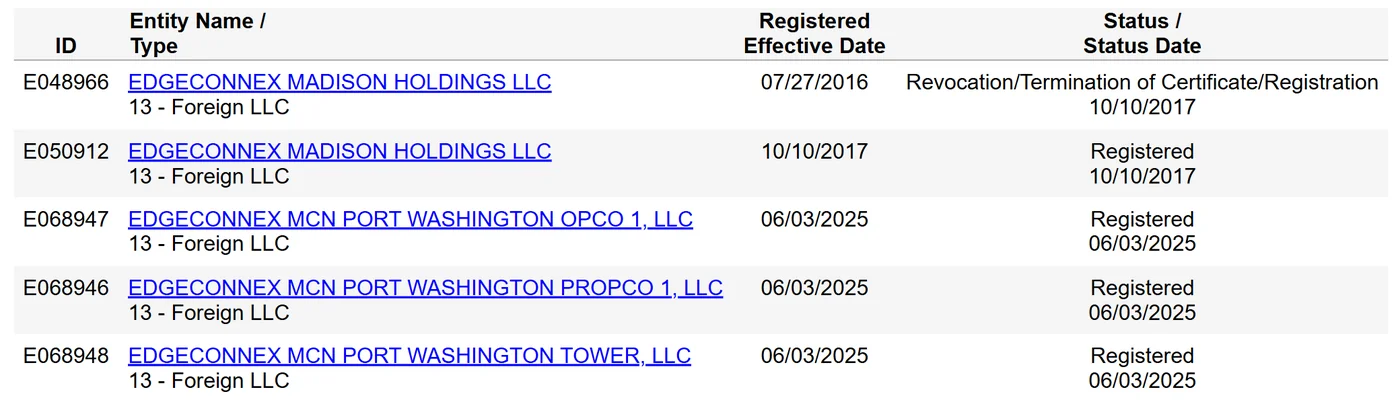
Once the results page appears, compare each listing carefully before clicking. Wisconsin search results typically show the DFI Entity ID, entity name, entity type, registered effective date, and status or status date, which helps you separate similar names. This is especially useful when you need to distinguish a domestic entity from a foreign entity, or when multiple businesses share similar wording in their names. Open the record that best matches your target business only after checking those details.

steps create llc online

Step 5: Review the Entity Record and Request Official Documents if Needed

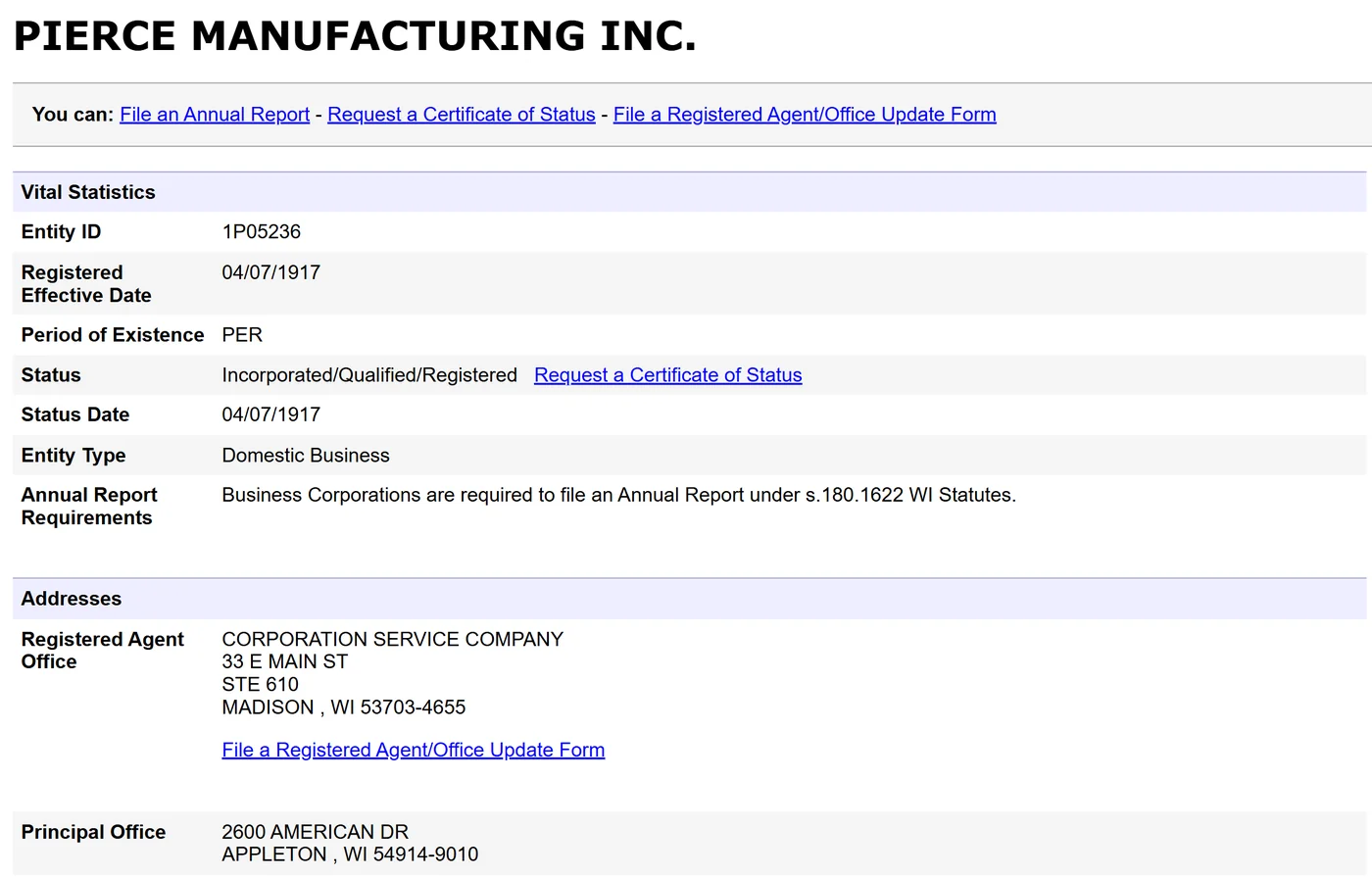
After opening the entity record, review the key public details on file, such as the legal business name, entity type, registered effective date, status, registered agent, and registered office. This helps you confirm that you have the correct Wisconsin record before relying on it for due diligence or filing decisions.

If you need formal proof or supporting documents, Wisconsin DFI handles those as separate services. You can request a Certificate of Status, a certified copy, or a simple copy through DFI’s records and copywork services rather than treating the search page itself as the final document source.

If you are reviewing an existing record, this is also where you can confirm whether a registered agent change has already been filed and reflected in the Wisconsin DFI record.

Field Note
Aaron Kra’s Take on Wisconsin Search Results

I always tell founders the same thing when they run a Wisconsin business search: a record in the DFI database is useful, but it is not a legal green light. I use the search to confirm that an entity is on file, review its status, and check details like the registered agent and registered office.

What I do not do is treat that result as proof that the business is fully compliant, properly licensed for its industry, or automatically entitled to use a name. In Wisconsin, a name search is only preliminary until the filing is examined and accepted. That is why I treat the database as a starting point, not the final answer.

Why I pay attention to this
  • I can confirm whether I am looking at the correct entity record.
  • I can review status and filing details before relying on the business record.
  • I can avoid assuming a name is available before DFI accepts the filing.
My advice: I use the Wisconsin search to verify the entity type, status, and registered agent first. Then I check whether any extra licensing or filing requirements apply before moving forward.

Wisconsin Corporation Search: What You Need to Know

When looking specifically for corporate data, keep in mind that Wisconsin categorizes business registration details according to legal structure. Whether you’re verifying compliance or exploring potential investments, it helps to understand the state’s approach to corporate records.

Difference Between LLC, Corporation, and Other Entities in Wisconsin

Wisconsin businesses can form under various structures, each with distinct governance and liability considerations:

  • Corporation: Often has shareholders, a board of directors, and is subject to more formal reporting requirements.
  • LLC (Limited Liability Company): Combines limited liability with flexible management, typically requiring fewer formalities.
  • Nonprofits: Organized for charitable or public benefit, subject to special tax rules.
  • Partnerships: General or limited partnerships that share profits and losses among partners.

No single form suits everyone. An LLCin Wisconsin might be ideal for entrepreneurs seeking flexibility, whereas a corporation may better accommodate larger expansions or investment strategies. If you're also considering business opportunities in nearby states, an Illinois company search can help confirm business registrations there.

❓ Questions to Ask
  • Do you want flexible management and fewer formalities?
  • Will you need shareholders or outside investment?
  • Are you forming the organization for a charitable or public-benefit purpose?
  • Will profits, losses, and management be shared among partners?

How to Search Specifically for Corporations

A wisconsin corporation search focuses on entities registered as C-corps, S-corps, and other corporate forms. When using the portal, include terms like “Corp” or “Inc” alongside the name if you’re dealing with a large corporate entity. This approach filters out LLCs or partnerships, providing you with a curated list of corporations only. You can also filter by ID or agent details if you want to skip partial matches and jump straight to a verified record.

Understanding Business Status (Active, Dissolved, Delinquent, etc.)

When conducting a Wisconsin corporate records search, you’ll notice statuses indicating the organization’s legal standing:

  • Active: Current on state filings and permitted to operate
  • Dissolved: Formally ended operations or merged with another entity
  • Delinquent: Missed key filings or fees, risking additional penalties
  • Suspended: Temporarily barred from certain transactions due to noncompliance

Confirming this status helps you see if a based in Wisconsin corporation is still viable. A delinquent or dissolved listing might require further investigation, especially if you plan to invest or partner with that business.

⚠️ Attention
Do not treat every listing the same. An active entity is current on filings, while dissolved, delinquent, or suspended statuses may signal legal, financial, or operational issues that require deeper review before you move forward.

Northwest Registered Agent Wisconsin Name Search Tools

Northwest Registered Agent provides expert guidance on Wisconsin business name searches and state compliance.

How to Verify a Business in Wisconsin

To verify a business in Wisconsin, start with the Wisconsin DFI Corporate Records Search to confirm that the entity is on file and review its public record. The search can help you check the business name, status, status dates, registered agent, registered office, and filing history. If you need formal proof, request a Certificate of Status or certified copies directly from the Wisconsin Department of Financial Institutions.

For a more careful review, compare the DFI record with any industry-specific licensing or tax requirements that may apply to that business. Wisconsin also points new businesses to the Department of Revenue and the One Stop Business Portal for tax registration and related compliance steps, so the entity search should be treated as a starting point, not the only check.

To maintain compliance, selecting the best Wisconsin registered agent ensures proper handling of legal and tax documents.

How to Check Business Name Availability in Wisconsin

To check business name availability in Wisconsin, use the DFI Name Availability Search or the public corporate records database for a preliminary search. This helps you see whether the exact name, or a confusingly similar name, is already on record with the department.

Keep in mind that this search is only preliminary. Wisconsin DFI makes clear that final name availability is determined only after the department examines and accepts the filing. If you want to hold a name before filing, you can submit a 120-day name reservation. The fee is $15 for LLCs, business corporations, cooperatives, and LLPs, and $10 for LPs and nonstock corporations.

If you are still deciding on a brandable name, this guide to LLC name examples can help you brainstorm better options before you file.

To ensure your business name is unique across multiple jurisdictions, follow this guide on how to check LLC names for a detailed verification process.

How to Register a Business in Wisconsin (Step-by-Step Guide)

If you want to register a business in Wisconsin, the exact steps depend on the structure you choose. LLCs, corporations, LLPs, LPs, and several other entity types file with the Wisconsin Department of Financial Institutions (DFI), while sole proprietors may instead need a tradename and tax registration rather than a separate entity filing.

Before you file, follow these steps:

  1. Choose your business structure. Pick the structure that fits your liability, tax, and management needs. This matters because the filing rules are different for LLCs, corporations, partnerships, and sole proprietorships.
  2. Search your business name. Use the Wisconsin DFI records search or name availability search to check whether your preferred name is already on record. Keep in mind that the result is only preliminary until DFI reviews and accepts the filing.
  3. File your formation documents with DFI. For example, a Wisconsin LLC files Articles of Organization with DFI. The current online filing fee for a Wisconsin LLC is $130, and DFI also offers optional expedited service for an extra $25.
  4. Check licenses and permits. After formation, review the Wisconsin One Stop Business Portal and any industry-specific requirements to see whether you need state or local licenses, permits, or registrations before you start operating.
  5. Register for taxes and get an EIN if needed. Wisconsin businesses may need to register with the Department of Revenue, and many businesses also need an EIN from the IRS. The IRS issues EINs for free, so We recommend using the official IRS application directly and avoiding paid third-party sites.
  6. Stay compliant after registration. Most Wisconsin entities must file annual reports and keep their registered agent, registered office, and principal office details current. For domestic entities, annual reports are generally due in the quarter of the anniversary date. For foreign entities, the annual report is generally due by March 31 each year.

For a complete guide, follow this step-by-step process to start an LLC in Wisconsin and ensure compliance with state regulations.

How to Perform an Advanced Wisconsin Business Search

If a basic name search brings up too many results, use the Wisconsin DFI Advanced Search. It lets you narrow results by current name or old name, entity type, and other record fields so you can find the right business faster.

The advanced search is most useful when you need to:

  • filter by entity type, such as domestic or foreign entity and specific entity categories like LLCs or corporations.
  • search by current name or include old names if a business may have changed its name.
  • search by registered agent, registered office, or DFI Entity ID number when a name search is too broad.

This is a practical way to confirm you have the correct record before reviewing filings, checking status, or ordering a certificate.

✨ Not to be missed
The Wisconsin DFI database is an excellent public-record starting point, but official documents and any extra licensing checks still matter before you rely on a business record.

FAQ About Wisconsin SOS Business Search

Here are the most common questions about Wisconsin’s records lookup process. Each response aims to be succinct yet comprehensive, giving you straightforward insights and ensuring you can make informed decisions.

Is the Wisconsin business search free?

Yes. Wisconsin’s DFI Corporate Records Search is publicly available to use at no cost. If you need official proof or copies, DFI charges separate fees, including $10 for a Certificate of Status, $10 for a certified copy, and $5 for a simple copy.

How often is the Wisconsin SOS business database updated?

Wisconsin DFI does not clearly promise a fixed public update schedule for every filing. However, DFI says most online filings are accepted upon receipt and that filers receive notice immediately, so online records are often updated quickly. If you need confirmation on a specific filing, contact DFI directly.

What should I do if I can’t find a business in the WI SOS search?

First, double-check the spelling, punctuation, and spacing in the business name. If you still do not find a match, try the Wisconsin DFI Advanced Search or search by DFI Entity ID, registered agent, or registered office. If the record still does not appear, the business may be using a different legal name, may no longer be active, or may not be registered with DFI. For filing questions, contact DFI rather than the Secretary of State.

How do I update business information in the Wisconsin SOS database?

To update business information in Wisconsin, file the appropriate change or amendment with the Wisconsin Department of Financial Institutions. Depending on the change, this may include a registered agent or office update, an amendment, or an annual report filing. Once DFI processes the filing, the updated information should appear in the public record.

Can I find business owner details through the Wisconsin search tool?

Usually, no. Wisconsin DFI says business entities are not required to reveal ownership information to the department. For corporations, DFI may have officer and director information on file, but it does not disclose shareholder ownership through the normal public record in the way many readers expect.

How long does it take for a new business to appear in the WI SOS search?

Wisconsin DFI does not publish a single guaranteed timeframe for when every new business record will appear in the public search. DFI does state that most online filings are accepted upon receipt and that the filer receives notice immediately. If you have already received filing confirmation but still do not see the entity, contact DFI to verify the record status.

References

Harbor Compliance Wisconsin SOS Search Support

Harbor Compliance offers comprehensive Wisconsin business entity searches and helps protect your business identity.

  • Aaron Kra Boost Suite

    Aaron Kra, JD, Founder and Editor-in-Chief of Boost Suite, is a recognized authority on LLC formation, registered agents, and small-business compliance.
    A graduate of the University of Texas School of Law (ABA-accredited), he founded Boost Suite to turn complex state rules into plain-English, step-by-step guidance. For 9+ years, he has helped entrepreneurs with entity selection, registered-agent requirements, and multi-state compliance, and he leads the site’s legal/tax review.


    Previously, Aaron practiced business law in Austin (LLC/PLLC formations, conversions/domestications, UCC-1 filings, multi-state registrations) and completed a year-long secondment with a national registered-agent provider, working with filing clerks in 25+ states. At Boost Suite, he checks each guide with official US sources and updates everything when necessary. Read moreAUTHTOROIRN about Aaron Kra and Boost Suite.

Disclaimer: The information provided on this page is for general educational purposes only and should not be considered legal or tax advice. Laws and regulations differ by state or country, may change over time, and always depend on your personal circumstances. The comments section is designed for readers to share insights and personal experiences, but these do not replace professional guidance. For personalized advice regarding legal or tax matters, please consult with a licensed attorney, CPA, or qualified advisor. To learn how we select partners, vet sources, and keep content accurate, see our editorial policy.

Leave a Comment