

If you need to verify a company in New York, the best place to start is the official New York business search database maintained by the Department of State, Division of Corporations. You can search by business name or DOS ID and review core filing details such as entity type, county, filing date, registered agent information if listed, and whether the entity is active or inactive.
New York Business Search Overview
A New York business entity search lets you check the official New York Secretary of State database (Department of State, Division of Corporations) to confirm a business record and review key public details like entity status and DOS ID. Many people refer to this as an “LLC lookup” when they’re searching specifically for a New York LLC. The sections below break down what the search is for, who uses it, and the main benefits.
Definition and Purpose of a New York Business Search
A New York business entity search means checking the New York Department of State database to confirm that a business entity record exists and to review the public filing details attached to it. The goal is usually to identify the correct entity (especially when names are similar) and pull key info such as the exact legal name, entity type, DOS ID, county, filing date, and current status (for example, active or inactive).
If you are specifically researching a New York LLC, people often call this step an “LLC lookup,” but the database covers more than just LLCs.
Many people also call this the New York Secretary of State business search, but the official tool is run by the NY Department of State (Division of Corporations). Whether you’re running a New York state LLC search or a quick NY business search, this is the best official starting point.
Who Can Use the New York Business Entity Database?
This database is public, so it is used by a wide range of people, including:
- Entrepreneurs and startups checking similar names and confirming an entity record before filing
- Investors and lenders doing basic due diligence before financial agreements
- Attorneys and compliance teams validating an entity’s status and record details
- Vendors and partners confirming they are dealing with the correct legal entity
- Researchers and public agencies reviewing public business records when needed
Because it’s an online lookup tool, it’s often the fastest way to verify that you have the right New York entity before you move forward with paperwork or contracts.
Key Benefits of Conducting a New York Business Search
Running a New York business entity search helps you make decisions with cleaner, more reliable information. The main benefits include:
- Screening similar names to reduce confusion before you file or sign agreements
- Confirming entity status so you know whether the business is shown as active or inactive
- Reducing fraud risk by confirming the entity is actually on file with the state
- Supporting due diligence by pulling identifiers like the DOS ID and matching the record to the right entity
If your goal is name clearance, the search is a strong first filter, but it should be treated as a screening step rather than a final “name approval.”
Turn your business search into an NY LLC with ZenBusiness
Found the name you want? ZenBusiness can help you form your NY LLC, file your paperwork, and keep your business on track with an easy, guided process.
How to Perform a New York Business Search Step by Step
A New York business search is straightforward if you follow a repeatable workflow: open the official database, choose the right search type, and set your match mode. If you started with a New York LLC search, NY LLC search, or tried to look up NY LLC, the steps below will help you narrow results and confirm the DOS ID on the detail page.
Step 1: Open the official New York business search database
Go to the New York Department of State page for the Corporation and Business Entity Database and click the official “Search the Database” link to open the search form. This matters because third-party sites often mimic the tool, but the official database is the source of truth.

Step 2: Open the search form and set your search fields
Click into the database search so you land on the main form (the page that shows the fields: Search By, EntityName/ID input, Entity type, Search Functionality, and Entity list). This is the screen where you configure the search before clicking “Search the Database.”
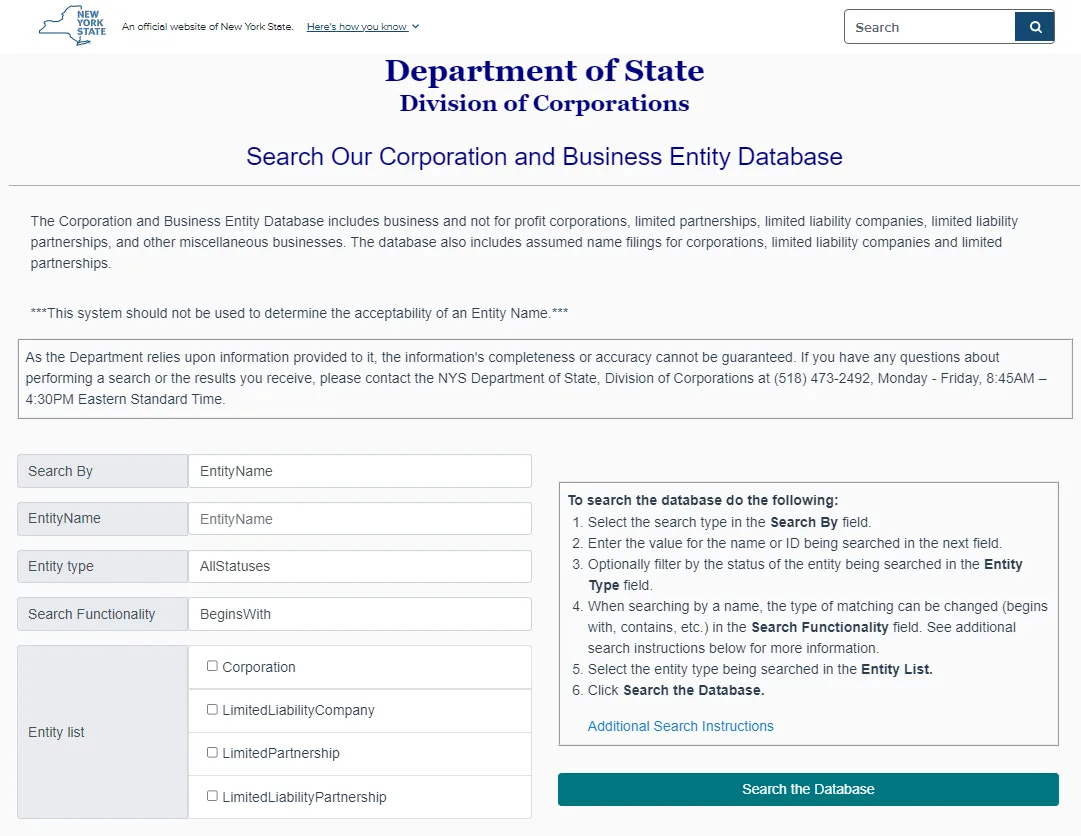
On this search form, you’ll see a few fields that control how the database searches and which results it shows. Set them first, then run your search. Here’s a quick guide to what each field means.
Choose Search By (what you’re searching with)
Pick the method based on what information you already have:
- EntityName → use this when you only know the business name
- DOS ID → use this when you have the ID (most accurate)
- Assumed Name → use this for a DBA / assumed name search
- Assumed Name ID → use this if you already have the assumed name ID

If you’re doing an NYS corp search (or a broader New York corporation search), make sure you’re not filtering results to LLCs only.
Filter by Entity type (status)
This helps you narrow results by the entity’s status:
- AllStatuses → best starting point if you’re unsure
- Active / Inactive / Suspended → use these when you want fewer results

Choose Search Functionality (how the name match works)
This controls how strict or broad the name matching is:
- BeginsWith → best first try (cleaner results)
- Contains → broader results (good if you’re unsure of the exact name order)
- BaseWord → useful when you want the system to match words more flexibly

Select Entity list (which type of entity you want)
If you only want LLC results, check LimitedLiabilityCompany. If you leave this broad, the results may include other entity types too.

Step 3: Run an example search
After your fields are set, enter the name and click Search the Database. In this example:
- Search By: EntityName
- EntityName: Blue Harbor
- Entity type: AllStatuses
- Search Functionality: Contains
- Entity list: LimitedLiabilityCompany checked
Then click “Search the Database.”

Step 4: Review the results list and pick the correct record
When you search a common stem (like “Blue Harbor”), the results list is where you narrow down which exact entity you want. Don’t click the first match, scan the columns and use a quick elimination process.
- Name
This is the legal name on file. Small formatting differences can matter, so read it exactly as shown. - DOS ID #
This is the best “unique identifier.” If you’re doing due diligence, this matters more than the name because names can be similar. - Assumed Name ID #
Often blank. If it appears, it usually means the record is tied to an assumed name filing (DBA-type info). Treat it as a “bonus clue,” not your primary identifier. - Status (e.g., Active)
Useful, but not the whole story. Always confirm on the detail page because you can see extra compliance indicators (like statement status). - Entity Type
This helps you avoid clicking the wrong kind of business. For example, “Domestic Limited Liability Company (LLC)” vs “Professional Service Limited Liability Company (PLLC).”
This is especially helpful if you started with a broad New York corp search or NY entity search, since similar names can appear under different business types - Date of First Filing
Helps you separate lookalike names (older vs newer), and can be a credibility clue for vendors. - County
Useful for context, but don’t treat it as “where they operate.” It’s still a helpful filter when you’re trying to confirm you have the right record.

How to tighten the list (filters → iterate)
- Filter to the right entity type first.
Check LimitedLiabilityCompany under Entity list if you only want LLC results (otherwise you may see corporations, PLLCs, and more). - Use status filters strategically.
Set Entity type = Active to focus on currently active entities. If you’re screening a new name, start with AllStatuses first, because older records can still matter when you’re checking for close conflicts. - Flip match mode (Search Functionality).
Try BeginsWith to keep results tight. Switch to Contains to catch extra words around your stem (for example, “Blue Harbor Holdings”). If results feel inconsistent, BaseWord can help when you’re matching by words rather than exact starts. - Add a specific variant (don’t rely on cosmetic tweaks).
Test realistic variants like Blue Harbor Holdings, Blue Harbor Group, BlueHarbor, or Harbor Blue. You’ll usually find that punctuation, spacing, or adding “LLC” doesn’t meaningfully change results. - Open the exact record to confirm.
Click the entity name to open the detail page and confirm DOS ID, Entity Type, and Entity Status. If the page shows Statement Status (for example, “Past Due”), use that as an extra due-diligence signal.
Will it pass? (name screening in New York)
| Candidate name | Verdict | Why / How to fix |
|---|---|---|
| Blue Harbor LLC | ❌ Likely conflict | Same core stem as multiple existing results. Add a distinctive lead word. |
| Blue-Harbor LLC | ❌ Cosmetic | Hyphen/spacing/punctuation typically don’t create a meaningful distinction. |
| The Blue Harbor LLC / Blue Harbor Co., LLC | ❌ Cosmetic | “The,” “Co./Company,” and endings rarely change the overall impression. |
| Blue Harbor New York LLC / Blue Harbor NY LLC | ⚠️ Often too weak | Geographic add-ons can still feel generic if the core stem is unchanged. Add a unique brand word. |
| Harborline Blue Harbor LLC | ✅ Often works (screening) | Distinctive lead (“Harborline”) + your stem creates a clearer separation. |
| Blue Harbor Waterfront Consulting LLC | ✅ Often works (screening) | Longer, specific descriptor reduces overlap with simpler stems. |
| Sierra Vista Blue Harbor LLC | ✅ Often works (screening) | Distinctive lead + stem creates a different overall impression. |
Step 5: Open the entity detail page to confirm key fields
Click the entity name to open the detail page. This is where you verify you have the right record (Entity Name + DOS ID + Status), and where you may also see extra signals like Statement Status and Next Statement Due Date.

Form your NY LLC with Northwest
After searching the database and narrowing down your name options, Northwest can help you file your NY LLC with a simple process and strong privacy protection.
Field Note: Aaron Kra’s New York LLC Record Verification Routine
When the results list shows multiple similar names, I do not guess. I use a quick verification routine so I click the right record, read the status correctly, and know when a screenshot is not enough.
I lock onto the DOS ID, not the name
- I treat the DOS ID as the primary identifier when names are similar.
- I use entity type, county, and first filing date as quick tie-breakers.
- If I cannot confidently match the record, I refine the search first.
I read the detail page, not just the results row
- I compare entity status with statement status and the next due date.
- Active can still show a past due statement status, and that matters in real transactions.
- If something looks off, I open Name History and Filing History immediately.
I connect DBAs before I trust a brand name
- If a business markets under a different name, I check Assumed Name History.
- This helps me confirm the public-facing name maps to the actual entity record.
- It also helps when the initial name search returns no results.
I know when official proof is required
- If a bank or partner wants proof, I request a Certificate of Status, not a screenshot.
- If the deal requires documents, I order copies of filings instead of relying on summaries.
- This is the cleanest way to avoid disputes over what the record actually shows.
What this prevents in real life
The New York business search database is most useful when you treat it like a verification workflow. I trust the result only after the DOS ID, the detail page signals, and the history tabs align.
Troubleshooting New York Business Search Issues
If your New York business search isn’t returning results, it’s usually a settings or formatting issue, not that the business “doesn’t exist.” Try these quick fixes:
- Clean up the name input: remove punctuation and endings like “LLC” first, then search using the core words.
- Switch match mode: if BeginsWith returns nothing, try Contains. If Contains gives too many results, go back to BeginsWith and add 1 more specific word.
- Check your filters: if you set Entity type = Active and get nothing, switch back to AllStatuses. Confirm the correct Entity list is checked (for example, LimitedLiabilityCompany for LLC-only results).
- Try assumed name (DBA) searching: if the public-facing name isn’t found, use Search By = Assumed Name (or Assumed Name ID if you have it).
- Name changes: if the business renamed, the current record may not match the old name wording. Use Name History on the entity detail page to confirm.
- Temporary site issues: if the form loads but buttons don’t respond, try another browser or disable extensions and retry.
If you still can’t find the record, remember the Department of State notes the database relies on submitted information and completeness can’t be guaranteed. In that case, contacting the NY Department of State, Division of Corporations is the most direct next step.
Exploring Business Name Availability in New York
Before you file, it’s smart to screen your LLC name against existing records. The New York business search database is a strong first filter for similar names, but it should not be treated as final name approval. Use it to spot obvious conflicts, then use the state’s name availability inquiry or name reservation process if you want a stronger pre-filing check.
If you’re wondering can I start an LLC without a business, here are your options
Why Checking Name Availability Is Crucial
A quick name screening step can save you time and prevent avoidable issues later. It helps you spot close matches that could confuse customers, trigger rebranding, or slow down your filing process. It’s also a practical way to confirm your name idea is actually usable before you invest in a logo, domain, or marketing.
You can discover our article for check llc names.
How to Confirm Name Compliance with NY Rules
At a minimum, your LLC name must include “Limited Liability Company” or “LLC / L.L.C.” and it must be distinguishable from other entities on file. New York also restricts certain words (especially regulated or agency-type terms), and some terms may require additional approvals. If your name includes sensitive words, confirm the restriction rules before you file to avoid delays.
Steps to Reserve an LLC Name in New York (60 days)
In New York, LLC name reservation is not a “click and pay online” process in the same way some states do it. It’s typically handled through the official reservation form and submission to the Department of State.
Here’s the practical process:
- Go to the New York Department of State page for LLC name reservation and download the “Application for Reservation of Name.”
- Fill in your proposed LLC name and your contact details.
- Prepare the $20 filing fee (plus optional expedited handling if you need faster processing).
- Submit the application to the Division of Corporations using the delivery method listed on the official page (mail/hand delivery).
- Keep your reservation confirmation for your records while you prepare your Articles of Organization.
This reservation gives you a short window to prepare your filing, but the state still makes the final determination when it reviews and files your formation documents.
For professional assistance, consider the best LLC service in NY.
Tools and Resources for Name Availability Checks
To check name availability in New York, it helps to use a layered approach. Start with the official New York business search database to screen for similar names, then use a stronger pre-filing step (like a name reservation or name availability inquiry) and a trademark search to reduce brand conflicts.
| Tool/Platform | Main Feature | Ideal For |
|---|---|---|
| NY Department of State Business Entity Database | Official New York records (name, DOS ID, status, entity type) | First-pass screening for similar names and confirming an existing entity |
| NY Name Reservation / Name Availability Inquiry | Stronger pre-filing check through New York’s DOS process | When you want added confidence before filing Articles of Organization |
| USPTO Trademark Search (TESS) | Federal trademark screening (brand conflicts beyond state records) | Checking brand risk before investing in a name, logo, or marketing |
| Domain Search (Registrar lookup) | Checks domain availability for your exact brand name | Matching your LLC name to a usable website/domain |
For more inspiration and practical naming ideas, take a look at our collection of creative LLC name examples and business name ideas.
Verifying an LLC’s Legal Standing and Documents
Before you partner, invest, or sign a contract with a New York LLC, it’s smart to confirm what the Department of State shows on the official record. At a minimum, you want to verify the entity’s status, confirm whether its Biennial Statement is current, and know how to request official copies or a Certificate of Status if a bank, lender, or client asks for proof.
What Legal Statuses Mean: Active, Dissolved, or Suspended
In the New York business entity database, you will commonly see Active and Inactive, and the search filters also include Suspended. Use these as screening signals, then open the entity detail page to confirm the full context (for example, “Statement Status” and any history tabs).
- Active:
The entity is currently listed as active in DOS records. However, active does not automatically mean “everything is current.” For example, an entity can still show a Past Due Biennial Statement status on the detail page, and Certificates of Status can reflect that past-due condition. - Inactive:
The entity is not currently active in DOS records. This can happen for different reasons (for example, dissolution or other status changes). Use Filing History and related tabs to understand what changed. - Suspended (important for NY LLCs):
New York specifically states that failure to meet the publication + Certificate of Publication filing requirement within 120 days can result in suspension of the LLC’s authority to carry on, conduct, or transact business. If you see suspension-related issues, verify publication compliance and the record history.
How to Verify Certificates of Incorporation and Other Filings
For an LLC, the key formation document is the Articles of Organization (not a certificate of incorporation). Many other documents (amendments, mergers, dissolutions, and related filings) may also exist depending on the entity’s history.
A practical verification workflow:
- Confirm the entity detail page matches the business you’re dealing with (exact name, DOS ID, entity type, county, and status).
- If you need official proof for a transaction, request:
- Copies (plain or certified) of filings from the Division of Corporations (online ordering is available, and electronic copies are available for many entities formed/authorized on or after 07/30/1990).
- A Certificate of Status (fee $25) by written request (mail/hand delivery, fax, or email are accepted per DOS instructions).
- If you’re checking publication compliance for a NY LLC, confirm whether a Certificate of Publication was filed (it must be submitted with newspaper affidavits and a $50 filing fee).
Using Public Records to Confirm Ownership and Licenses
These records help you verify a New York LLC beyond the basic search result. Use the operating agreement to confirm signing authority, check the correct agency for license verification, and keep publication proof on file if the LLC is subject to New York’s publication requirement.
| Type of Record | Purpose | Access Method |
|---|---|---|
| Operating Agreement | Shows member/manager authority and internal governance | Internal document (request from the business if needed) |
| Licensing Records | Confirms sector-specific credentials (varies by industry) | Verify through the relevant NY agency’s license lookup (not always the DOS entity database) |
| Publication Proof (NY LLCs) | Supports compliance with NY’s publication requirement | Affidavits come from newspapers; the Certificate of Publication is filed with NY DOS (copies can be requested if needed) |
Ensuring Compliance with NY State Regulations
New York LLC compliance is mainly governed by the state’s Limited Liability Company Law, while corporations fall under the New York Business Corporation Law, so the requirements you check can vary by entity type.
For basic compliance screening, these are the highest-signal checks:
- Biennial Statements:
NY corporations and LLCs file every 2 years in the calendar month of their original filing month. If past due, DOS records can reflect that, and a Certificate of Status will also reflect it—this can block certain transactions until corrected. - Publication requirement (NY LLCs):
publish as required and file the Certificate of Publication within 120 days, or the LLC’s authority can be suspended. - Service of process address updates:
if you need to update certain record addresses, note that DOS describes specific filing methods (some changes cannot be handled through a biennial statement amendment and require a separate filing like a Certificate of Change/Amendment). - Trademark/brand risk:
screening the state database helps with state-record conflicts, but trademark conflicts are a separate layer (keep this as a short note so the section stays minor).
Next Steps: How to Start an LLC in New York After Your Search
Now that you’ve confirmed your name and checked the record details in the New York business search database, the next steps are straightforward. Use this quick checklist to move from “search” to “officially formed,” without turning this page into a full formation guide.
- Pick your final LLC name (and do a last conflict screen)
Use the New York business search results to avoid close matches, make sure your name includes “LLC” (or “L.L.C.”), and double-check any restricted terms before filing. - File your Articles of Organization
This is the official formation filing for a New York domestic LLC. The state filing fee is $200.
If you’re budget-conscious, learn how to create a cheap LLC without compromising quality - Set your service-of-process details (and optional registered agent)
New York uses the Secretary of State as the default agent for service of process, and your filing includes a mailing address where legal papers are forwarded. If you’re doing a New York registered agent search, keep in mind the database may only show a separate registered agent if the entity actually designated one. You can also add an additional registered agent if you want (find the New York registered agent that suits your needs). - Adopt a written Operating Agreement (within 90 days)
New York requires LLC members to adopt a written operating agreement before, at the time of, or within 90 days after filing the Articles of Organization. - Complete the NY publication requirement (within 120 days)
Within 120 days, publish notice once per week for 6 consecutive weeks in 2 newspapers in the county where the LLC office is located, then file the Certificate of Publication with the state (fee applies). - Get an EIN from the IRS (if you need one)
Most LLCs get an EIN for banking, hiring, and tax filings. The IRS issues EINs online for free. - Register for NY taxes only if your business requires it
For example, if you’ll make taxable sales, you generally must register for NY sales tax at least 20 days before you begin business. - Put the ongoing compliance on your calendar
New York LLCs file a Biennial Statement every 2 years in the calendar month of their original filing month (statutory fee $9).

If you want the full walkthrough with filing links, timelines, and common mistakes to avoid, see our complete guide to forming a New York LLC.
Troubleshooting and FAQs for NY LLC Lookups
Even after you understand the NY business search database, a few practical questions come up. This FAQ covers common roadblocks, how to interpret NY DOS fields, and what to do when you need official proof.
What to Do If Your Search Yields No Results?
If your search returns nothing, try these quick fixes first:
– Remove punctuation and endings like “LLC” and search the core words.
– Switch Search Functionality (Begins With vs Contains).
– Confirm you selected the correct Entity List (for example, LimitedLiabilityCompany).
– If the business uses a DBA, try Search By = Assumed Name.
If you still cannot find it, contact the NY Department of State, Division of Corporations using the phone number and hours listed on the official database page.
How to Correct Errors in the NY Business Database?
If something is wrong on the public record, the fix is usually a specific filing (for example, a certificate of amendment or certificate of change) depending on what needs to be updated. The NY DOS explains that certain updates cannot be handled through a simple biennial statement amendment, and some changes require a separate certificate filing.
If the issue is related to biennial statement filing or the entity shows “Past Due,” NY DOS directs users to file the biennial statement online, or contact the Statement Unit if online filing is not possible.
Can Foreign LLCs Be Searched in New York?
Yes, if an out-of-state LLC registers (is authorized) to do business in New York, it appears in the NY DOS database and can be searched the same way. NY DOS also notes that a foreign LLC remains active in New York until it files a surrender or termination of authority, depending on the situation.
How Often Is the NY Database Updated?
NY DOS does not publish a fixed update schedule on the database page. A practical rule is to allow a few business days after a filing is processed, especially if a document requires review. If timing is critical, re-check the record and contact the Division of Corporations for confirmation.
Are There Free Alternatives to the Official Database?
The NY DOS database search is free and is the best source for official entity record information. For name availability, NY DOS offers a separate written name availability search process, with a fee per name, and it cannot be handled by phone.
Third-party sites can be useful for quick context, but they may be incomplete or outdated, so use them only as secondary references.
What Are the Privacy Implications of an LLC Lookup?
Basic entity details and service-of-process forwarding information are part of the public record. NY DOS states it can provide the address where the Secretary of State forwards process, and the registered agent name and address if one is designated.
If privacy matters, many businesses use a registered agent service so a home address is less likely to appear in public-facing records.
How to Interpret the Results of Your LLC Search?
Start with these fields:
– DOS ID: the most reliable identifier when names are similar.
– Entity Status: Active vs Inactive gives a quick screening signal.
– Statement Status: If a biennial statement is past due, NY DOS notes the record can reflect that, and a Certificate of Status will also show it, which can block certain transactions until corrected.
If you need official proof, use NY DOS document copy ordering and the Certificate of Status request process, rather than relying on screenshots alone.
- New York State Department of State: Biennial Statement (eBiennial/e-Statement Filing System)
- New York State Department of State: Certificate of Assumed Name (DBA)
- New York State Department of State: Articles of Organization
- New York State Department of State: Certificate of Publication – Domestic LLC
- New York State Senate: Limited Liability Company Law §204
- New York State Senate: Limited Liability Company Law §206 (Affidavits of Publication)
- New York State Department of State: Fee Schedules (Division of Corporations Filings)
- United States Patent and Trademark Office (USPTO): Search Our Trademark Database
Looking for an overview? See New York LLC Services
Stay Compliant with Expert Help
Harbor Compliance ensures your NY LLC meets all legal requirements. Get guidance on entity searches, filings, and compliance.